

- Products
- Learn
- Local User Groups
- Partners
- More

AI Security Masters E7:
How CPR Broke ChatGPT's Isolation and What It Means for You
Blueprint Architecture for Securing
The AI Factory & AI Data Center
Call For Papers
Your Expertise. Our Stage
Good, Better, Best:
Prioritizing Defenses Against Credential Abuse
Ink Dragon: A Major Nation-State Campaign
Watch HereCheckMates Go:
CheckMates Fest
I have deployed the following test architecture in AWS and I was facing some issues related to outbound traffic and source IP preservation.
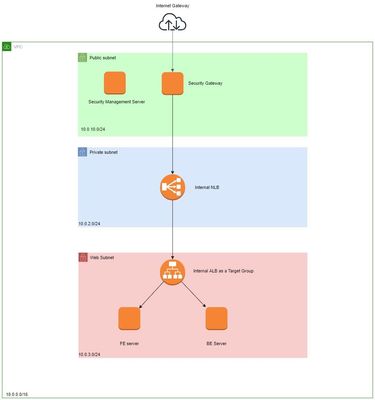
I am trying to route the traffic from the FE and BE servers to the internet from the check point firewall, but I am not able to route it even after setting up static route from the webserver subnet to the firewall private subnet interface.
Also I wanted to preserve the source IP address but because of the Manual NAT rule, it is being replaced to the private interface of the firewall so as to be able to resolve dns of the nlb. Is there any way to preserve source IP address as it is required for google analytics.
Change to destination NAT which would be the static IP of the NLB and then view the VPC flow logs to see if the traffic is getting to the NLB. If you verify the traffic is getting sent to the ALB, then there is a routing issue. Is there a 0.0.0.0/0 route on the NLB subnet to send traffic back to the firewalls ENI.
https://docs.aws.amazon.com/elasticloadbalancing/latest/network/load-balancer-monitoring.html
what does that internal LB doing there ?
what routes do you have in FE and BE Subnets in AWS ?
you need to create a route in AWS forwarding traffic towards the GW internal interface (10.0.2.x).
after that you need to create a NAT rule hiding those subnets behind the Firewall External interface IP so they can reach the internet.
this admin guide is for a cluster but you can see how to do it here:
As Nir indicated, you need a subnet route for 0.0.0.0/0 to the firewalls internal ENI and a NAT rule. If that does not work, check the security groups for the hosts and the SG for the firewalls internal ENI and the NACLs for the subnets. Also, make sure you have the appropriate routes on the firewall for return traffic to the backend hosts. Are you using the NLB to utilize a static IP for inbound traffic for routing to the ALB? What does the NLB have to do with outbound traffic? I only see one firewall in the architecture drawing. Regardless, if you are routing from the host directly to the firewalls ENI for outbound traffic, the client's IP will be preserved in the firewall logs but utilize the firewalls NAT rule for sending traffic to the internet.
Yes I am using NLB for routing incoming traffic on port 80 and 443. It has nothing to do with the outbound traffic.
So the internal nlb is for routing the http traffic from elastic ip attached to the gateway.
FE and BE are in the same subnet 10.0.3.0/24. And they have local route and a 0.0.0.0/0 to the private interface of the gateway.
Hide internal network behind gateway is already enabled.
Do you see the internal traffic get to the gateway? Is DNS resolution working on the internal hosts? Try nslookup www.checkpoint.com. Are the routes on the firewall configured for the internal subnets?
No the internal traffic is not reaching the gateway.
1. Check DNS resolution to make sure it is working on the hosts.
2. Connect to an external hosts via the IP from one of the hosts to see if the traffic gets to the firewall.
3. Check the SG for the internal hosts to make sure you are allowing the appropriate ports outbound which I assume are 80 and 443.
4. Is anti-spoofing enabled on the firewalls internal interface?
5. Is the source/destination check disabled on the the firewalls internal ENI - AWS ENI setting.
6. Check the NACLs. They are not stateful which requires an outbound and inbound rule.
7. Check the SG and NACL for the firewalls external interface as well.
8. Verify the firewalls routes in via the CLI or WebUI to verify the firewall has routes for the internal subnets that need the outbound access.
The outbound internet access for the internal servers is working just the ping command is not working, otherwise curl and apt are working properly. In the previously mentioned architecture not the new one.
Now I just want to work on preserving the source IP address till it reaches the webservers, because of the manual NAT rule it gets overwritten. How can I preserve the source IP address after NAT? @JoSec
Regarding inbound access to your webservers which I think your last comment is indicating, are you not seeing the client IP address in the x-forwarded-for header in the web server logs? Is verbose logging enabled on the web server?
I have created logs for the internal nlb and alb. Also in the nginx access logs i can only view the internal alb interface ip address. Can th earlier mentioned nat rule be replaced with something else as in that rule I need to translate the original source.
In your config, your firewall is not behind an ALB/NLB so are you are using a destination NAT to send the traffic directly to the NLB? If yes, the client IP will be forwarded by the NLB to the ALB. Check the NLB attributes as well. Are you doing a source NAT as well for inbound traffic?
I am doing source NAT for forwarding incoming http and https traffic to the nlb. I am using secondary elastic IP for forwarding the traffic.
I assume you tried removing the source NAT and doing just a destination NAT? I know if you front-end the gateways with an ALB you have to source NAT to an IP address not within your VPC CIDR to route the traffic back to your gateways. Not sure if required if the traffic is directly from your firewall to the NLB.
I tried doing destination nat but the traffic wouldn't reach the nlb. I tried by adding a static route to the nlb subnet also but no success.
Change to destination NAT which would be the static IP of the NLB and then view the VPC flow logs to see if the traffic is getting to the NLB. If you verify the traffic is getting sent to the ALB, then there is a routing issue. Is there a 0.0.0.0/0 route on the NLB subnet to send traffic back to the firewalls ENI.
https://docs.aws.amazon.com/elasticloadbalancing/latest/network/load-balancer-monitoring.html
There is route on the NLB subnet for 0.0.0.0/0 to firewall private interface ENI.
Use the VPC flow logs to validate if traffic is getting to the NLB and if their is a response.
It has started working now. I am able to see source IP address at the load balancers as well the webservers.

Leaderboard
Epsum factorial non deposit quid pro quo hic escorol.
| User | Count |
|---|---|
| 7 | |
| 4 | |
| 3 | |
| 2 | |
| 2 | |
| 2 | |
| 1 | |
| 1 |
Tue 28 Apr 2026 @ 06:00 PM (IDT)
Under the Hood: Securing your GenAI-enabled Web Applications with Check Point WAFThu 30 Apr 2026 @ 03:00 PM (PDT)
Hillsboro, OR: Securing The AI Transformation and Exposure ManagementTue 28 Apr 2026 @ 06:00 PM (IDT)
Under the Hood: Securing your GenAI-enabled Web Applications with Check Point WAFTue 12 May 2026 @ 10:00 AM (CEST)
The Cloud Architects Series: Check Point Cloud Firewall delivered as a serviceThu 30 Apr 2026 @ 03:00 PM (PDT)
Hillsboro, OR: Securing The AI Transformation and Exposure ManagementAbout CheckMates
Learn Check Point
Advanced Learning

YOU DESERVE THE BEST SECURITY







