- Products
- Learn
- Local User Groups
- Partners
- More

Step Into the Future of
AI-Powered Cyber Security
The State of Ransomware Q1 2026
Key Trends and Their Impact
AI Security Masters E8:
Claude Mythos: New Era in Cyber Security
Blueprint Architecture for Securing
The AI Factory & AI Data Center
Call For Papers
Your Expertise. Our Stage
CheckMates Go:
CheckMates Fest
Hi forum!
My management server has been integrated with azure (I set up the data centre server).
I can read all the objects in Azure. (I'm running R80.10 gateway and mgt)
I have set up Identity Awareness too.
My gateways are not enforcing the rules I have created with datacentre objects! ![]()
Everything looks perfect on the management server, I can even see the IP addresses dynamically associated with the tags!!
I need some help figuring out why the gateways are not enforcing the rules.
I have looked all over for this - and I have a case raised, but TAC have gone a bit quiet!
Anyone help me with locating the documentation for this? I have looked everywhere.
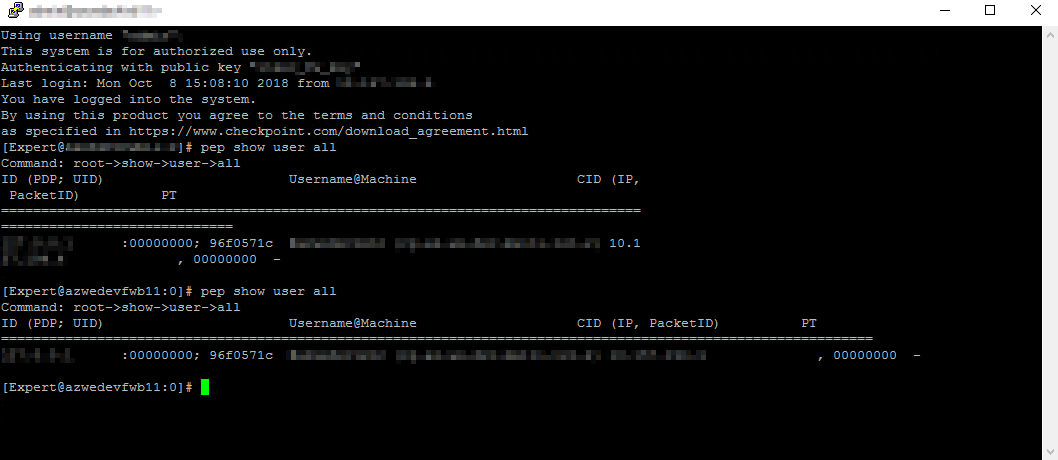
When I do a "pep show user all" (not sure if this shows output on azure integration) i get nothing on the gateway - whcih makes sense.
Are there any logfiles? I have checked /var/log/messages - nothing!
Thanks! ![]()
I think: TAC will know better ![]()
GW side:
"$FWDIR/log/azure_had.elg*" log files.
"$FWDIR/conf/azure-ha.json" log file.
"$FWDIR/log/cloud_proxy.elg" log file.
+
How to troubleshoot Updatable Objects in R80.20 (and higher)
Azure portal reports read and/or write limits, throttling API resources
I'll post up root cause and corrective action when I am done - share the wealth - I suspect it's something I have overlooked!!
Dynamic enforcement enabled!!!!
So I missed out the bold bits
HTH anyone who has the same issue as me ![]()
validate with pep show user all

Data Center objects works also with on-prem GW.
Top response ofirsea040d26-f1f2-3b12-9fc6-5c89debaf56c! I was thinking about getting R80.20 and just blowing away my cirrent install.
Thanks again mate - much appreciated
Hello,
I have problems with that data center objetcs on an VMSS gateway in Azure.
I have enabled the Identity Awareness blade with the autoprov CLI feature. The VMSS gateway has an active Identity Awareness blade, the Remote Web API is checked, and one autogenerated host with IP 127.0.0.1 is added.
I have added the data center object for Azure, and everything is fine, I can seach all objects in my Azure inventory.
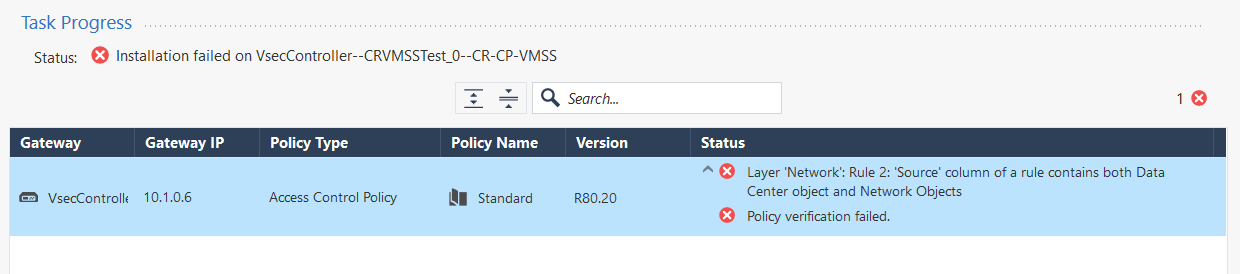
But when I would like to install the policy with one virtual machine from that Azure inventory, I receive an error.
If you have any good advise, because I'm normally familar with that data center objects for on-prem vCenter environments. In my opinion, it should the nearly "the same" for Azure objects...
Management and VMSS gateway is running on R80.20.
Best Regards,
Carsten
Hi Carsten,
Dont panic!
All thats happened it is you must have combined regular objects, and objects learned from Azure in the same source field in the rule
Easiest thing I expect is to duplicate the rule, and in one rule leave the normal objects, and in the other rule put the objects in that are learned from azure
HTH
Upps, life can be so easy when you only read the error message 🙂
You're right Nicholas, that was the problem, it is working now - thanks a lot!
Leaderboard
Epsum factorial non deposit quid pro quo hic escorol.
| User | Count |
|---|---|
| 1 | |
| 1 | |
| 1 |
Tue 12 May 2026 @ 10:00 AM (CEST)
The Cloud Architects Series: Check Point Cloud Firewall delivered as a serviceWed 13 May 2026 @ 11:00 AM (EDT)
TechTalk: The State of Ransomware Q1 2026: Key Trends and Their ImpactThu 14 May 2026 @ 07:00 PM (EEST)
Under the Hood: Presentando Check Point Cloud Firewall como ServicioTue 12 May 2026 @ 10:00 AM (CEST)
The Cloud Architects Series: Check Point Cloud Firewall delivered as a serviceTue 19 May 2026 @ 06:00 PM (IDT)
AI Security Masters E8 - Claude Mythos: New Era in Cyber SecurityAbout CheckMates
Learn Check Point
Advanced Learning
YOU DESERVE THE BEST SECURITY