- Products
- Learn
- Local User Groups
- Partners
- More
MVP 2026: Submissions
Are Now Open!
What's New in R82.10?
Watch NowOverlap in Security Validation
Help us to understand your needs better
CheckMates Go:
Maestro Madness
Hi, I am trying to use Run-Script module. Below is my code
---
- hosts: check_point
connection: httpapi
gather_facts: False
vars_files:
- 'credentials/ansible_login_information.yml'
tasks:
- name: run-script
check_point.mgmt.cp_mgmt_run_script:
script: ./stat.sh
script_name: 'Check stat'
targets:
- Some_Server
wait_for_task_timeout: 30
shell script
#!/bin/bash
cpstat os -f all
TASK [run-script] ******************************************************************************************************************************************
fatal: [check_point]: FAILED! => {"changed": false, "msg": "Task Some_Server - Check stat with task id af3660dc-9e23-4a90-a398-6d54357a failed. Look at the logs for more details"}
I noticed this playbook is not running my script. What can I do to fix this erroor
My only guess regarding the SIC error is that the target definition isn't reachable or hasn't been fully configured yet.
The run-script will not copy a script from the local directory and deploy it to a remote deployment for use. You need to insert the body of the script into the "script" command before running it from the management API.
script:
description:
- Script body contents.
type: str
required: true
This mirrors the run-script API documentation.
- https://sc1.checkpoint.com/documents/latest/APIs/index.html#cli/run-script~v1.7%20
I haven't run this in my lab, so this might not provide the results. However, I would expect it to look similar to below.
---
- hosts: check_point
connection: httpapi
gather_facts: False
vars_files:
- 'credentials/ansible_login_information.yml'
tasks:
- name: run-script
check_point.mgmt.cp_mgmt_run_script:
script: "cpstat os -f all"
script_name: 'Check stat'
targets:
- deployed-gw-1
wait_for_task_timeout: 30
EDIT: One other thing I didn't mention is that you'll need to query the task-id from the run-script command to see the results for this particular playbook.
Try specifying the full path to the script.
If not, I recommend checking the task status in SmartConsole to see what it says.
The shell script is in the same directory as the playbook.
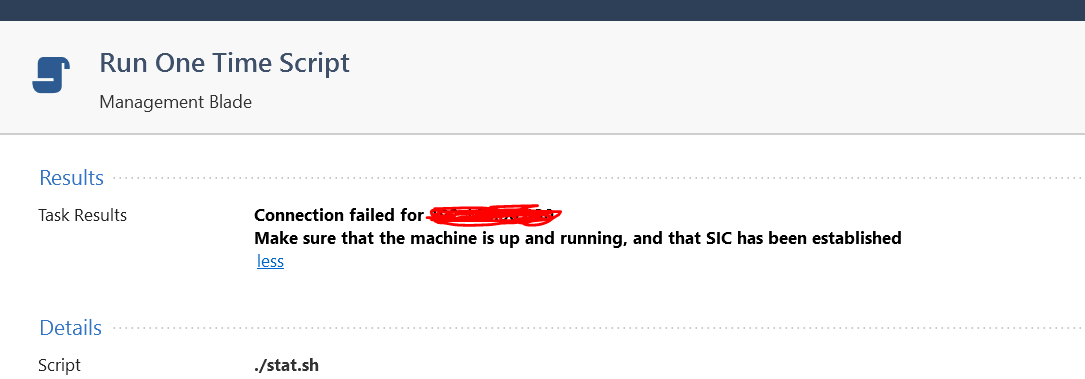
Error message on SmartConsole
Run One Time Script
Results ..............................................................
Task Results Connection failed for 192.1.1.1
Make sure that the machine is up and running, and that
SIC has been established
Details ..............................................................
Script ./stat.sh
Connection failed for IP Address
Makes sure that the machine is up and running, and that SIC has been established
My only guess regarding the SIC error is that the target definition isn't reachable or hasn't been fully configured yet.
The run-script will not copy a script from the local directory and deploy it to a remote deployment for use. You need to insert the body of the script into the "script" command before running it from the management API.
script:
description:
- Script body contents.
type: str
required: true
This mirrors the run-script API documentation.
- https://sc1.checkpoint.com/documents/latest/APIs/index.html#cli/run-script~v1.7%20
I haven't run this in my lab, so this might not provide the results. However, I would expect it to look similar to below.
---
- hosts: check_point
connection: httpapi
gather_facts: False
vars_files:
- 'credentials/ansible_login_information.yml'
tasks:
- name: run-script
check_point.mgmt.cp_mgmt_run_script:
script: "cpstat os -f all"
script_name: 'Check stat'
targets:
- deployed-gw-1
wait_for_task_timeout: 30
EDIT: One other thing I didn't mention is that you'll need to query the task-id from the run-script command to see the results for this particular playbook.
Leaderboard
Epsum factorial non deposit quid pro quo hic escorol.
| User | Count |
|---|---|
| 1 | |
| 1 |
Tue 16 Dec 2025 @ 05:00 PM (CET)
Under the Hood: CloudGuard Network Security for Oracle Cloud - Config and Autoscaling!Thu 18 Dec 2025 @ 10:00 AM (CET)
Cloud Architect Series - Building a Hybrid Mesh Security Strategy across cloudsTue 16 Dec 2025 @ 05:00 PM (CET)
Under the Hood: CloudGuard Network Security for Oracle Cloud - Config and Autoscaling!Thu 18 Dec 2025 @ 10:00 AM (CET)
Cloud Architect Series - Building a Hybrid Mesh Security Strategy across cloudsAbout CheckMates
Learn Check Point
Advanced Learning
YOU DESERVE THE BEST SECURITY