- Products
- Learn
- Local User Groups
- Partners
- More

MVP 2026: Submissions
Are Now Open!
What's New in R82.10?
Watch NowOverlap in Security Validation
Help us to understand your needs better
CheckMates Go:
Maestro Madness
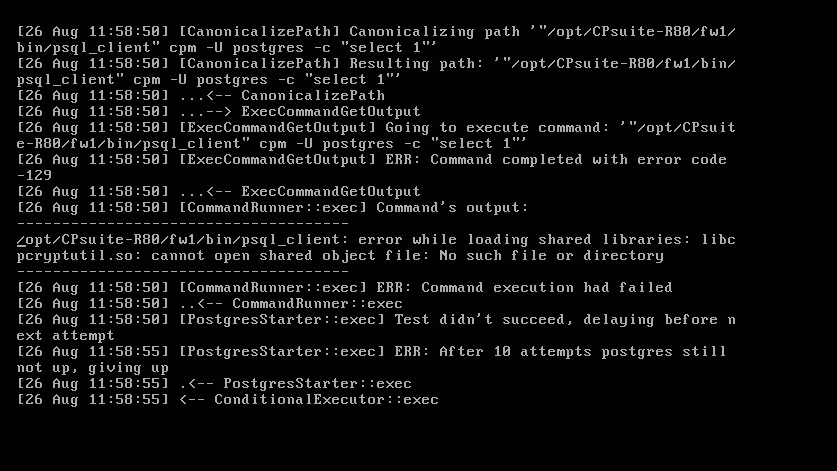
Running into this, when running 'migrate export ....' in a bash script. It works fine directly from command the command line.
RE: R80.00 GA manager
I attached the output from the migration log.
I'm going to try adding the shared library to the PATH first. Maybe it's a postgreSQL HBA issue for a local user, not sure yet.
Adding PGDIR, PATH and libraries worked and the backup worked fine.
Now, on the test restore, I'm getting psql.bin: FATAL: password authentication failed for user "postgres"
Hi,
We will check the issue and let you know.
Please verify that you are running your process under root permissions.
You are not able to run psql_client without being root.
Thanks.
This is a R80.00 GA to R80.00 GA migrate export/import. Yes, I'm running in expert mode. I also verified the same issue happens taking my script out of the equation.
This issue can be replicated from the $FWDIR/bin/upgrade_tools/migrate binary, both migrates used (on the source and destination R80 -build 101 boxes is 10870840 bytes (the same version).
#NOTE: After rebuilding the box I was importing too, the issue dis-appeared, restored to a clean box worked.
This was using take 29 for source and destination, I see take 63 is out now.
We are trying to investigate the psql_client issue and we need to know more information about what was done on the environment:
1. Did you modify in any way $FWDIR/conf?
2. Can you list the exact libs/files you added/modified?
3. What do you mean by "test restore"?
1. No
2. 0 libs/files modified
3. migrate export / migrate import
I also tried to migrate export/import with a different migrate utility that is 127
Still got the same psql.bin: FATAL: password authentication failed for user "postgres"
This is going from R80.00 take 29 to R80.00 take 29.
My next test will be to go from R80.00 take 29 to R80.00 take 63.
Has anybody tried migrate export/import with R80. I get the same issue with postgres password authentication going from:
take 29 to jumbo 63
take 29 to take 29
jumbo 63 to jumbo 63
How can you update the postgres user, allow the postgres user?
Is this just a HBA issue ?
I'm not planning on moving to R80 until 'migrate' works .
I have a case open with TAC and this is a known issue. They are working on it. I'll update this discussion once resolved.
I was able to successfully import to a restore box today on T113/29 jumbo 63 to T113/29 (no jumbo) as instructed per TAC and it worked! I was then able to connect to the newly restored manager on R80 T113/29 with the newer R80 T113/29 jumbo take 63 smart console client to the the older R80 T113/29 system. So, good news I didn't get the postgres user error.
Leaderboard
Epsum factorial non deposit quid pro quo hic escorol.
| User | Count |
|---|---|
| 4 | |
| 1 | |
| 1 | |
| 1 | |
| 1 | |
| 1 | |
| 1 | |
| 1 | |
| 1 | |
| 1 |
Tue 16 Dec 2025 @ 05:00 PM (CET)
Under the Hood: CloudGuard Network Security for Oracle Cloud - Config and Autoscaling!Thu 18 Dec 2025 @ 10:00 AM (CET)
Cloud Architect Series - Building a Hybrid Mesh Security Strategy across cloudsTue 16 Dec 2025 @ 05:00 PM (CET)
Under the Hood: CloudGuard Network Security for Oracle Cloud - Config and Autoscaling!Thu 18 Dec 2025 @ 10:00 AM (CET)
Cloud Architect Series - Building a Hybrid Mesh Security Strategy across cloudsThu 08 Jan 2026 @ 05:00 PM (CET)
AI Security Masters Session 1: How AI is Reshaping Our WorldAbout CheckMates
Learn Check Point
Advanced Learning
YOU DESERVE THE BEST SECURITY