- Products
- Learn
- Local User Groups
- Partners
- More

Step Into the Future of
AI-Powered Cyber Security
What's New in R82.10?
Register HereWhen the Agents Attack
A Live Look at Agentic Exposure Validation
AI Security Masters E8:
Claude Mythos: New Era in Cyber Security
CheckMates Go:
CheckMates Fest
Is there any sort of script in R80.10 to delete a specific tag out of all objects?
The calls that you need to do in order to achieve the described deletion are nearly the same for all kinds of objects. However, it won't be trivial as you'd still need to specify the object types that should get checked and deleted. If you, for example, just want to check rules, hosts, networks, services this could be done quiet easily. I'd recommend the official Check Point Python SDK package in order to do this as it contains lots of prewritten functions that help you even more. For example, there is one function ("api_query"), that automatically checks all existing objects if more than the default value matches. Therefore you would not need to care regarding the overall return sum etc.
If you are not familiar with python yet you can also take a look at the pre written scripts, that are also placed in the same repository and adjust them for your needs. As far as I remember the script documentation is quite nice, so that you should get the meaning behind each line at ease.
Hi Christopher,
What if you just delete the Tag itself?
Tal
Oh **bleep**, seems like I misunderstood the question, I thought the objects that a specific tag is attached to should get deleted.
Looks like there is no way how to find which objects have a specific tag assigned (via CLI).
API commands "show tag" nor "show tags" with details-level full are not helpful in this case.
You can check it via SmartConsole -> Manage and Settings ->Tags -> right click on Tag -> Where Used...
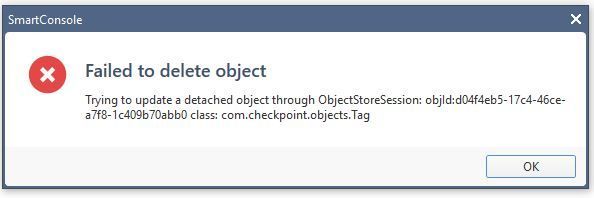
I get an error some weird error when trying to delete the tag. Essentially I used smartmove in this scenario and it added a tag to every object I imported into management and I then want to eventually export this package via a python script, but you can't import objects with this python script if it has tags. If there is a way to specify delete tag for other network groups, service groups and hosts, that would be great.
Can you add a screenshot of the error? it sounds as something that we should look at to see if it's a bug.
Thanks
Tal
Below is the error message I receive when attempting to delete the tag. I'll attempt the script you provided and let you know the results. Thanks.
There were no pending changes to publish and I'm the only admin of this particular environment. In the process of running this provided script. Unfortunately it looks like it runs a command for each object and then publishes it, so it's probably going to take a while, but better then having to double click every object manually.
Ok, thanks.
Leaderboard
Epsum factorial non deposit quid pro quo hic escorol.
Tue 16 Jun 2026 @ 05:00 PM (CEST)
Under the Hood: Check Point SASE | Internet Access Optimization & Performance TuningThu 18 Jun 2026 @ 10:00 AM (CEST)
The Cloud Architects Series: Check Point WAF - The Next Generation of AI powered protectionTue 23 Jun 2026 @ 05:00 PM (CEST)
Under the Hood: Check Point Cloud Firewall | Securing all of your clouds: Art of the possibleTue 16 Jun 2026 @ 05:00 PM (CEST)
Under the Hood: Check Point SASE | Internet Access Optimization & Performance TuningThu 18 Jun 2026 @ 10:00 AM (CEST)
The Cloud Architects Series: Check Point WAF - The Next Generation of AI powered protectionTue 23 Jun 2026 @ 05:00 PM (CEST)
Under the Hood: Check Point Cloud Firewall | Securing all of your clouds: Art of the possibleThu 25 Jun 2026 @ 10:00 AM (PDT)
AI Security Masters E10: READY OR NOT: Securing the AI Enterprise 2/5 - AI Red TeamingAbout CheckMates
Learn Check Point
Advanced Learning
YOU DESERVE THE BEST SECURITY