- Products
- Learn
- Local User Groups
- Partners
- More

MVP 2026: Submissions
Are Now Open!
What's New in R82.10?
Watch NowOverlap in Security Validation
Help us to understand your needs better
CheckMates Go:
Maestro Madness
Hi guys ,
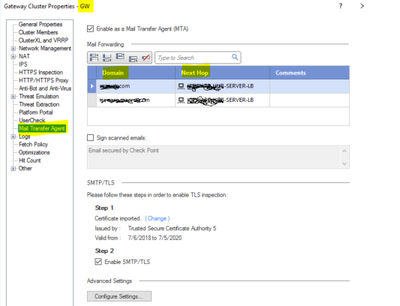
I am looking for the script/command needed to be run which takes care of MTA config ( adding mail domain , next hop ) on gateway automatically everytime a new Gateway spins up .
Is there any know script/ cmd syntax I can use to do this in the below auto-provision of VMSS ?? I didn’t find any mgmt_cli command …
As I mentioned on the other thread, this will require the use of Generic Objects API.
The Generic Objects API can be used to manipulate (parts of) objects that do not have otherwise have formal API support.
Changes made via this API are not guaranteed to work at all and may not work after upgrades.
Formal APIs should always be used where possible as they are versioned (and thus backward compatible) and are fully supported by TAC/R&D.
The downside of using the Generic Object API is that you will have to do some work to figure out the correct calls to make.
Formal support for editing MTA settings on a gateway object would require an RFE.
Note for @Amiad_Stern and team 😀
As a starting point, you'll have to dump the specific object in question.
For example, the command mgmt_cli -r true show generic-objects name dummygw -f json gives me:
{
"objects" : [ {
"uid" : "dd30a946-0bef-46bf-8944-33a8ca3183a2",
"name" : "dummygw",
"type" : "simple-gateway",
"domain" : {
"uid" : "41e821a0-3720-11e3-aa6e-0800200c9fde",
"name" : "SMC User",
"domain-type" : "domain"
}
}, {
"uid" : "128adaf9-c547-8249-b864-ebbff501c311",
"name" : "dummygw",
"type" : "CpmiRoboEndPointStatus",
"domain" : {
"uid" : "41e821a0-3720-11e3-aa6e-0800200c9fde",
"name" : "SMC User",
"domain-type" : "domain"
}
} ],
"from" : 1,
"to" : 2,
"total" : 2
}
I suppose I could have gotten the UID for the gateway object a different way.
But once you have it, then you can dump all the "hidden" settings in the object using show generic-object uid dd30a946-0bef-46bf-8944-33a8ca3183a2 -f json
I won't paste the output here, but I can assure you there is a section of MTA settings and the rules.
Where my knowledge falls down (and where I hope R&D can help) is how to use the API to actually create/edit these rules.
@PhoneBoy - Can you please tag here any resources for comments ?
I would have expected the "set simple-gateway" command to have options for the MTA config. However it seems like - as the command says - you can only change simple settings by using it, like e.g. enabling/disabling blades.
Seems like there is currently no way to automate this with the mgmt api. It could be worth a try to dig deeper into the generic objects api, as it "allows" to automate much more. However the downsite in this case is that it is very generic and absolutely not user friendly. You can find examples on Check Mates where VPN configurations were automated with the just mentioned generic objects api.
Regards,
Maik
As I mentioned on the other thread, this will require the use of Generic Objects API.
The Generic Objects API can be used to manipulate (parts of) objects that do not have otherwise have formal API support.
Changes made via this API are not guaranteed to work at all and may not work after upgrades.
Formal APIs should always be used where possible as they are versioned (and thus backward compatible) and are fully supported by TAC/R&D.
The downside of using the Generic Object API is that you will have to do some work to figure out the correct calls to make.
Formal support for editing MTA settings on a gateway object would require an RFE.
Note for @Amiad_Stern and team 😀
As a starting point, you'll have to dump the specific object in question.
For example, the command mgmt_cli -r true show generic-objects name dummygw -f json gives me:
{
"objects" : [ {
"uid" : "dd30a946-0bef-46bf-8944-33a8ca3183a2",
"name" : "dummygw",
"type" : "simple-gateway",
"domain" : {
"uid" : "41e821a0-3720-11e3-aa6e-0800200c9fde",
"name" : "SMC User",
"domain-type" : "domain"
}
}, {
"uid" : "128adaf9-c547-8249-b864-ebbff501c311",
"name" : "dummygw",
"type" : "CpmiRoboEndPointStatus",
"domain" : {
"uid" : "41e821a0-3720-11e3-aa6e-0800200c9fde",
"name" : "SMC User",
"domain-type" : "domain"
}
} ],
"from" : 1,
"to" : 2,
"total" : 2
}
I suppose I could have gotten the UID for the gateway object a different way.
But once you have it, then you can dump all the "hidden" settings in the object using show generic-object uid dd30a946-0bef-46bf-8944-33a8ca3183a2 -f json
I won't paste the output here, but I can assure you there is a section of MTA settings and the rules.
Where my knowledge falls down (and where I hope R&D can help) is how to use the API to actually create/edit these rules.
Leaderboard
Epsum factorial non deposit quid pro quo hic escorol.
| User | Count |
|---|---|
| 4 | |
| 1 | |
| 1 | |
| 1 | |
| 1 | |
| 1 | |
| 1 | |
| 1 | |
| 1 | |
| 1 |
Tue 16 Dec 2025 @ 05:00 PM (CET)
Under the Hood: CloudGuard Network Security for Oracle Cloud - Config and Autoscaling!Thu 18 Dec 2025 @ 10:00 AM (CET)
Cloud Architect Series - Building a Hybrid Mesh Security Strategy across cloudsTue 16 Dec 2025 @ 05:00 PM (CET)
Under the Hood: CloudGuard Network Security for Oracle Cloud - Config and Autoscaling!Thu 18 Dec 2025 @ 10:00 AM (CET)
Cloud Architect Series - Building a Hybrid Mesh Security Strategy across cloudsAbout CheckMates
Learn Check Point
Advanced Learning
YOU DESERVE THE BEST SECURITY