- Products
- Learn
- Local User Groups
- Partners
- More

AI Security Masters E7:
How CPR Broke ChatGPT's Isolation and What It Means for You
Blueprint Architecture for Securing
The AI Factory & AI Data Center
Call For Papers
Your Expertise. Our Stage
Good, Better, Best:
Prioritizing Defenses Against Credential Abuse
Ink Dragon: A Major Nation-State Campaign
Watch HereCheckMates Go:
CheckMates Fest
With R80.10, an audit log for a deleted Access Control rule contains the name of the rule, and the list of policies and layers that contain it.
If you wish to get all the rule's information: source, destination, everything, you can leverage the
This can happen either on the MGMT machine itself, or via outside script.
In this example, I did it on the MGMT machine itself because every MGMT machine also has a tool called “JQ” which is preinstalled and allows to filter the results of the command. “show-changes” will show all changes that happened in the given session UID, and I’m sending the results to JQ which then filters them only to deleted access rules.
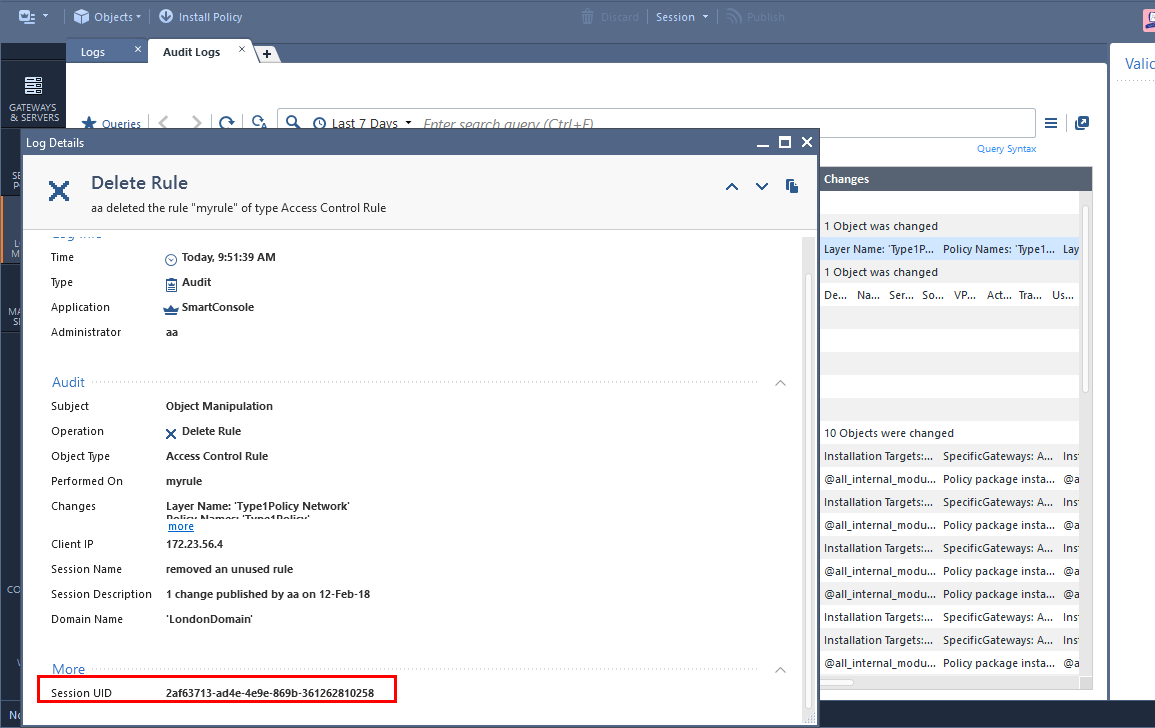
Step 1: get the session ID from the audit log card.

Step 2: On the security management machine, login and save the login details to a text file. We will use this text file to identify for the next command.
mgmt_cli login user [username] password [password] domain [domain, optional] > sid.txt
Step 3: Use the show-changes API with filter on deleted access rules and based on the session UID that we copied from step 1.
mgmt_cli show-changes -s sid.txt to-session 2af63713-ad4e-4e9e-869b-361262810258 details-level full --format json | jq -r '.tasks[]["task-details"][].changes[].operations["deleted-objects"][]|select(.type=="access-rule")'
result is attached to this thread (big json with all the data that the rule has) (2 rules were deleted in this session)
Step 4: logout
mgmt_cli logout -s sid.txt
Feedback is welcome.
With R80.10, an audit log for a deleted Access Control rule contains the name of the rule, and the list of policies and layers that contain it.
If you wish to get all the rule's information: source, destination, everything, you can leverage the
This can happen either on the MGMT machine itself, or via outside script.
In this example, I did it on the MGMT machine itself because every MGMT machine also has a tool called “JQ” which is preinstalled and allows to filter the results of the command. “show-changes” will show all changes that happened in the given session UID, and I’m sending the results to JQ which then filters them only to deleted access rules.
Step 1: get the session ID from the audit log card.

Step 2: On the security management machine, login and save the login details to a text file. We will use this text file to identify for the next command.
mgmt_cli login user [username] password [password] domain [domain, optional] > sid.txt
Step 3: Use the show-changes API with filter on deleted access rules and based on the session UID that we copied from step 1.
mgmt_cli show-changes -s sid.txt to-session 2af63713-ad4e-4e9e-869b-361262810258 details-level full --format json | jq -r '.tasks[]["task-details"][].changes[].operations["deleted-objects"][]|select(.type=="access-rule")'
result is attached to this thread (big json with all the data that the rule has) (2 rules were deleted in this session)
Step 4: logout
mgmt_cli logout -s sid.txt
Feedback is welcome.
With R80.10, an audit log for a deleted Access Control rule contains the name of the rule, and the list of policies and layers that contain it.
If you wish to get all the rule's information: source, destination, everything, you can leverage the
This can happen either on the MGMT machine itself, or via outside script.
In this example, I did it on the MGMT machine itself because every MGMT machine also has a tool called “JQ” which is preinstalled and allows to filter the results of the command. “show-changes” will show all changes that happened in the given session UID, and I’m sending the results to JQ which then filters them only to deleted access rules.
Step 1: get the session ID from the audit log card.

Step 2: On the security management machine, login and save the login details to a text file. We will use this text file to identify for the next command.
mgmt_cli login user [username] password [password] domain [domain, optional] > sid.txt
Step 3: Use the show-changes API with filter on deleted access rules and based on the session UID that we copied from step 1.
mgmt_cli show-changes -s sid.txt to-session 2af63713-ad4e-4e9e-869b-361262810258 details-level full --format json | jq -r '.tasks[]["task-details"][].changes[].operations["deleted-objects"][]|select(.type=="access-rule")'
result is attached to this thread (big json with all the data that the rule has) (2 rules were deleted in this session)
Step 4: logout
mgmt_cli logout -s sid.txt
Feedback is welcome.
I like that!
I like that!
Thank you so much. It 's very useful
This is a very old post, but glad to see that it's still useful 😁
There are actually easier ways to do this in today's latest versions. If you see an audit log for a deleted rule, you can look at the session name, find it in the Revisions view (under "Manage and Settings"), right click and select "Compare with previous".
That will open a visual change report with the session's changes, including the details of the deleted rule.
This is a very old post, but glad to see that it's still useful 😁
There are actually easier ways to do this in today's latest versions. If you see an audit log for a deleted rule, you can look at the session name, find it in the Revisions view (under "Manage and Settings"), right click and select "Compare with previous".
That will open a visual change report with the session's changes, including the details of the deleted rule.
Excuse me
Is this feature available on version R80.30?
Excuse me
Is this feature available on version R80.30?
The "Change Report" feature was added in R81