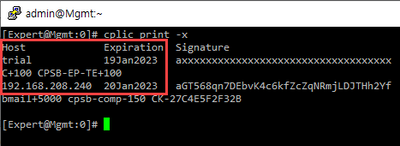
A frequent question we see on CheckMates is how to request an evaluation license (or extend an existing one).
Note that when you install a Firewall/Management appliance/virtual machine, a 15-day Plug-n-Play evaluation license is included.
For a factory defaulted SMB Appliance, the evaluation period is 30 days.
For usage beyond these periods, an evaluation license needs to be generated.
Evaluations requested through this process expire 30 days from date of generation.
This applies to the following products:
- Firewall
- Firewall Management
- Spark Firewall / SMB
- For 600/700/1100/1200R/1400 appliances, this applies only with R77.20.70 or above firmware
- Endpoint Security Products (including on-premise Management)
If this is the first time you've generated an evaluation, make sure you are associated with an account by checking My Check Point > My Accounts > My Accounts.

If one or more accounts are listed, you can create a new Evaluation license.
If no accounts are shown (as in this example), you will need to be added to an existing UC account by the account administrator or click on the Create Account button to create a new one.
Fill in the requested details and ensure the above screen lists the account you just created.
Now you can generate the evaluation license by going to the following URL, reachable under Customer Acquisitions > Try Our Products > Product Evaluation: https://usercenter.checkpoint.com/ucapps/prodeval
You will be given some options:
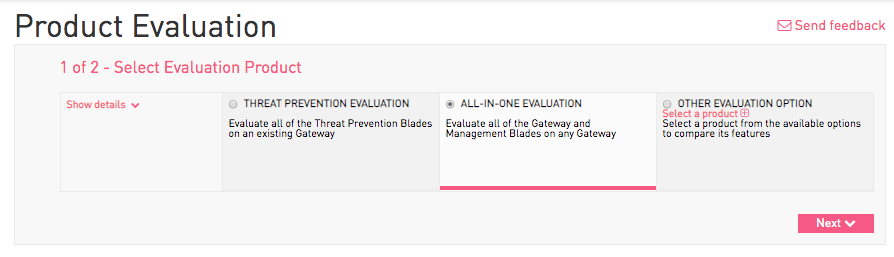
In the majority of cases, the All-In-One Evaluation is what you will want to choose.
This will give you a 30-day license for the following on a Check Point Appliance or Virtual Machine:
- Security Management with Multi-Domain and all features enabled
- Firewall with all Software Blades (up to 8 cores on Open Server)
- Remote Access (VPN) for Unlimited Users
- Endpoint Security Products for 100 users (can apply additional CPEP-SBA eval licenses for additional users).
For SMB appliances with R77.20.70 and above firmware, the All-in-One Eval license will enable all features for 30 days.
Click next and fill in the relevant details.

For IP Address, enter one of:
- The IP address of your Security Management Server.
- For locally managed SMB appliances, use any IP that is assigned to the LAN or DMZ (not loopback). Only apply the Security Gateway portion of the license without a module name (e.g. cplic put 192.0.2.10 29Mar2023 dT...).
Select the reason for evaluation and confirm the conditions under which the license is provided.
Click on Get Evaluation.
An evaluation license will be generated and instructions will be presented to you and also sent via email.

For SMB appliances:
- Generate a local license
- The evaluation license can only be applied on the CLI in expert mode (e.g. via cplic put)
- Only the gateway license string needs to be applied
For Evaluations Longer Than 30 Days: Either generate a new evaluation license at the end of the period and/or request a longer-term evaluation license through your local Check Point office.