- Products
- Learn
- Local User Groups
- Partners
- More

AI Security Masters E7:
How CPR Broke ChatGPT's Isolation and What It Means for You
Blueprint Architecture for Securing
The AI Factory & AI Data Center
Call For Papers
Your Expertise. Our Stage
Good, Better, Best:
Prioritizing Defenses Against Credential Abuse
Ink Dragon: A Major Nation-State Campaign
Watch HereCheckMates Go:
CheckMates Fest
Good afternoon,
I have 2 SMBs added from Checkpoint Management, I closed the VPN using SIC and VPN COMUTIES, when I try to access or ping the servers at both ends, it responds normally.
However, when I give a TRACERT on the LAN IP, it should go out through the firewall's LAN IP to the head office and vice versa, but it is going out to the public IP (WAN) and then arrives on the LAN network on the other side.
EXAMPLE:
tracert 192.168.0.100
1 <1 ms <1 ms <1 ms 192.168.200.247 - IP FW MATRIZ (FICTICIO)
2 5 ms 7 ms 7 ms 186.201.133.84 - WAN IP OF THE UNIT
3 8 ms 7 ms 6 ms 192.168.0.100 UNIT LAN IP
This is causing me a problem, I have equipment in the unit that needs to communicate with a server in the head office, but it has to be with the LAN IP, it is arriving with the WAN IP, and the connection is not completed.
Has anyone experienced a similar problem?
Thank you in advance for your support.
A simple network diagram will go a long way to helping us resolve your issue.
For traceroute in particular, what you're seeing is expected behavior.
Responses will always come from the nearest IP, even if you traceroute to a different IP on the same system.
From the remote end, the WAN IP is "nearest" to where the traceroute is coming from, therefore it will be used in all responses.
You will most likely need to configure a manual NAT rule here.
Good afternoon,
I tried to draw a picture here, I'm terrible, I hope you can understand. haha ha
How would I do Nat? I tried and was unsuccessful, could you please tell me?
I need the communication from the equipment at site 2 to arrive at site 1 with its LAN IP, in the server logs and via tracert, it reports that it arrived with the WAN IP.
The diagram is fine except it's not clear what side of the diagram is initiating the connection.
A NAT rule will not resolve the issue with traceroute this since the traffic is originating from the gateway itself.
It's also expected behavior.
You said you tried to do NAT.
Please show exactly what you attempted to do (with screenshots).
When you defined the site, did you disable the NAT option shown here?
Ensuring this is disabled should cause the traffic to not be subject to NAT at all (i.e. come from a 192.168.0.x address).
If it has to come from the LAN IP of the gateway (and not it's original LAN IP), then this option will need to be enabled and a manual NAT rule will need to be created.
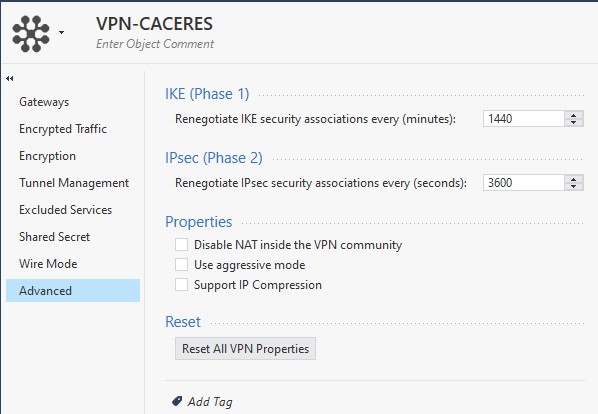
There is a similar setting in the VPN Community for centrally managed gateways:
If you enable this checkbox and push policy to the relevant gateways, a NAT rule should not be necessary.