- Products
- Learn
- Local User Groups
- Partners
- More

AI Security Masters E7:
How CPR Broke ChatGPT's Isolation and What It Means for You
Blueprint Architecture for Securing
The AI Factory & AI Data Center
Call For Papers
Your Expertise. Our Stage
Good, Better, Best:
Prioritizing Defenses Against Credential Abuse
Ink Dragon: A Major Nation-State Campaign
Watch HereCheckMates Go:
CheckMates Fest
Good afternoon,
I have 2 SMBs added from Checkpoint Management, I closed the VPN using SIC and VPN COMUTIES, when I try to access or ping the servers at both ends, it responds normally.
However, when I give a TRACERT on the LAN IP, it should go out through the firewall's LAN IP to the head office and vice versa, but it is going out to the public IP (WAN) and then arrives on the LAN network on the other side.
EXAMPLE:
tracert 192.168.0.100
1 <1 ms <1 ms <1 ms 192.168.200.247 - IP FW MATRIZ (FICTICIO)
2 5 ms 7 ms 7 ms 186.201.133.84 - WAN IP OF THE UNIT
3 8 ms 7 ms 6 ms 192.168.0.100 UNIT LAN IP
This is causing me a problem, I have equipment in the unit that needs to communicate with a server in the head office, but it has to be with the LAN IP, it is arriving with the WAN IP, and the connection is not completed.
Has anyone experienced a similar problem?
Thank you in advance for your support.
Good afternoon,
I have 2 SMBs added from Checkpoint Management, I closed the VPN using SIC and VPN COMUTIES, when I try to access or ping the servers at both ends, it responds normally.
However, when I give a TRACERT on the LAN IP, it should go out through the firewall's LAN IP to the head office and vice versa, but it is going out to the public IP (WAN) and then arrives on the LAN network on the other side.
EXAMPLE:
tracert 192.168.0.100
1 <1 ms <1 ms <1 ms 192.168.200.247 - IP FW MATRIZ (FICTICIO)
2 5 ms 7 ms 7 ms 186.201.133.84 - WAN IP OF THE UNIT
3 8 ms 7 ms 6 ms 192.168.0.100 UNIT LAN IP
This is causing me a problem, I have equipment in the unit that needs to communicate with a server in the head office, but it has to be with the LAN IP, it is arriving with the WAN IP, and the connection is not completed.
Has anyone experienced a similar problem?
Thank you in advance for your support.
Good afternoon,
I have 2 SMBs added from Checkpoint Management, I closed the VPN using SIC and VPN COMUTIES, when I try to access or ping the servers at both ends, it responds normally.
However, when I give a TRACERT on the LAN IP, it should go out through the firewall's LAN IP to the head office and vice versa, but it is going out to the public IP (WAN) and then arrives on the LAN network on the other side.
EXAMPLE:
tracert 192.168.0.100
1 <1 ms <1 ms <1 ms 192.168.200.247 - IP FW MATRIZ (FICTICIO)
2 5 ms 7 ms 7 ms 186.201.133.84 - WAN IP OF THE UNIT
3 8 ms 7 ms 6 ms 192.168.0.100 UNIT LAN IP
This is causing me a problem, I have equipment in the unit that needs to communicate with a server in the head office, but it has to be with the LAN IP, it is arriving with the WAN IP, and the connection is not completed.
Has anyone experienced a similar problem?
Thank you in advance for your support.
Good afternoon,
I have 2 SMBs added from Checkpoint Management, I closed the VPN using SIC and VPN COMUTIES, when I try to access or ping the servers at both ends, it responds normally.
However, when I give a TRACERT on the LAN IP, it should go out through the firewall's LAN IP to the head office and vice versa, but it is going out to the public IP (WAN) and then arrives on the LAN network on the other side.
EXAMPLE:
tracert 192.168.0.100
1 <1 ms <1 ms <1 ms 192.168.200.247 - IP FW MATRIZ (FICTICIO)
2 5 ms 7 ms 7 ms 186.201.133.84 - WAN IP OF THE UNIT
3 8 ms 7 ms 6 ms 192.168.0.100 UNIT LAN IP
This is causing me a problem, I have equipment in the unit that needs to communicate with a server in the head office, but it has to be with the LAN IP, it is arriving with the WAN IP, and the connection is not completed.
Has anyone experienced a similar problem?
Thank you in advance for your support.
Good afternoon,
I have 2 SMBs added from Checkpoint Management, I closed the VPN using SIC and VPN COMUTIES, when I try to access or ping the servers at both ends, it responds normally.
However, when I give a TRACERT on the LAN IP, it should go out through the firewall's LAN IP to the head office and vice versa, but it is going out to the public IP (WAN) and then arrives on the LAN network on the other side.
EXAMPLE:
tracert 192.168.0.100
1 <1 ms <1 ms <1 ms 192.168.200.247 - IP FW MATRIZ (FICTICIO)
2 5 ms 7 ms 7 ms 186.201.133.84 - WAN IP OF THE UNIT
3 8 ms 7 ms 6 ms 192.168.0.100 UNIT LAN IP
This is causing me a problem, I have equipment in the unit that needs to communicate with a server in the head office, but it has to be with the LAN IP, it is arriving with the WAN IP, and the connection is not completed.
Has anyone experienced a similar problem?
Thank you in advance for your support.
Good afternoon, in this case I use it through centralized management, the configuration is done in the Smart Console, following the attached nat rule, which I had tested.
Good afternoon, in this case I use it through centralized management, the configuration is done in the Smart Console, following the attached nat rule, which I had tested.
Good afternoon, in this case I use it through centralized management, the configuration is done in the Smart Console, following the attached nat rule, which I had tested.
Good afternoon, in this case I use it through centralized management, the configuration is done in the Smart Console, following the attached nat rule, which I had tested.
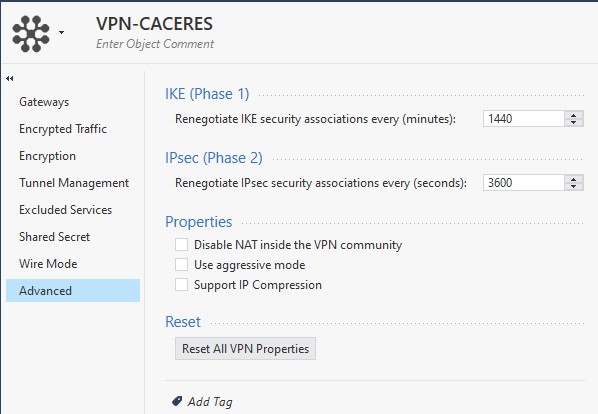
There is a similar setting in the VPN Community for centrally managed gateways:
If you enable this checkbox and push policy to the relevant gateways, a NAT rule should not be necessary.
There is a similar setting in the VPN Community for centrally managed gateways:
If you enable this checkbox and push policy to the relevant gateways, a NAT rule should not be necessary.
There is a similar setting in the VPN Community for centrally managed gateways:
If you enable this checkbox and push policy to the relevant gateways, a NAT rule should not be necessary.
There is a similar setting in the VPN Community for centrally managed gateways:
If you enable this checkbox and push policy to the relevant gateways, a NAT rule should not be necessary.
Good afternoon,
Perfect, I understand, we are on the right track, I enabled it and it stopped appearing in my server's log which is coming through the unit's WAN IP, but I still haven't shown the IP of the equipment but rather the firewall of my Headquarters, inserting a printout below.
It should not arrive with IP 192.168.0.247 which is from the matrix firewall, it should arrive with IP 192.168.200.100 which would be the LAN IP of the equipment in the unit.
I am attaching the complete Community configuration.
Good afternoon,
Perfect, I understand, we are on the right track, I enabled it and it stopped appearing in my server's log which is coming through the unit's WAN IP, but I still haven't shown the IP of the equipment but rather the firewall of my Headquarters, inserting a printout below.
It should not arrive with IP 192.168.0.247 which is from the matrix firewall, it should arrive with IP 192.168.200.100 which would be the LAN IP of the equipment in the unit.
I am attaching the complete Community configuration.
Good afternoon,
Perfect, I understand, we are on the right track, I enabled it and it stopped appearing in my server's log which is coming through the unit's WAN IP, but I still haven't shown the IP of the equipment but rather the firewall of my Headquarters, inserting a printout below.
It should not arrive with IP 192.168.0.247 which is from the matrix firewall, it should arrive with IP 192.168.200.100 which would be the LAN IP of the equipment in the unit.
I am attaching the complete Community configuration.
Good afternoon,
Perfect, I understand, we are on the right track, I enabled it and it stopped appearing in my server's log which is coming through the unit's WAN IP, but I still haven't shown the IP of the equipment but rather the firewall of my Headquarters, inserting a printout below.
It should not arrive with IP 192.168.0.247 which is from the matrix firewall, it should arrive with IP 192.168.200.100 which would be the LAN IP of the equipment in the unit.
I am attaching the complete Community configuration.
I'm not clear what the "matrix" firewall is, or, really where anything in the diagram is.
Please reattach a diagram making the following items clearly noted:
In any case, if the traffic is leaving the SMB gateway with the correct IP according to the logs, then the NAT probably isn't happening at the SMB gateway.
I'm not clear what the "matrix" firewall is, or, really where anything in the diagram is.
Please reattach a diagram making the following items clearly noted:
In any case, if the traffic is leaving the SMB gateway with the correct IP according to the logs, then the NAT probably isn't happening at the SMB gateway.
I'm not clear what the "matrix" firewall is, or, really where anything in the diagram is.
Please reattach a diagram making the following items clearly noted:
In any case, if the traffic is leaving the SMB gateway with the correct IP according to the logs, then the NAT probably isn't happening at the SMB gateway.
I'm not clear what the "matrix" firewall is, or, really where anything in the diagram is.
Please reattach a diagram making the following items clearly noted:
In any case, if the traffic is leaving the SMB gateway with the correct IP according to the logs, then the NAT probably isn't happening at the SMB gateway.
Hello partner, I still have the same problem, testing it but I couldn't get it to arrive correctly, any ideas so I can test it?
I appreciate all the support.
Hello partner, I still have the same problem, testing it but I couldn't get it to arrive correctly, any ideas so I can test it?
I appreciate all the support.
Hello partner, I still have the same problem, testing it but I couldn't get it to arrive correctly, any ideas so I can test it?
I appreciate all the support.
Hello partner, I still have the same problem, testing it but I couldn't get it to arrive correctly, any ideas so I can test it?
I appreciate all the support.