- Products
- Learn
- Local User Groups
- Partners
- More

What's New in Check Point SASE
Wednesday, 9 September @ 5pm CET / 11am EDT
The State of Ransomware Q2 2026:
This Quarter's Trends, and Their Impact on Your Defenses
AI Security Masters
Implementing the AI Security Trifecta
CheckMates Go:
Half is Not Enough
Hi Mates
We are trying to allow a link to specific youtube video using custom application/site in Application and URL Filtering.
What is happening is that when we copy the URL from the browser and create the custom application/site, use it in the rule with an Access role, the users in the access role are only able to play the video up to the minute/second when the link was copied from the browser. After reaching the time, the video no longer plays.
Any help as to what could be the reason behind this behavior? Is there anything we are missing?
The blade is enabled, HTTPS is enabled as well. We are using R80.20
Thanks in advance
Hi Mates
We are trying to allow a link to specific youtube video using custom application/site in Application and URL Filtering.
What is happening is that when we copy the URL from the browser and create the custom application/site, use it in the rule with an Access role, the users in the access role are only able to play the video up to the minute/second when the link was copied from the browser. After reaching the time, the video no longer plays.
Any help as to what could be the reason behind this behavior? Is there anything we are missing?
The blade is enabled, HTTPS is enabled as well. We are using R80.20
Thanks in advance
Hi Mates
We are trying to allow a link to specific youtube video using custom application/site in Application and URL Filtering.
What is happening is that when we copy the URL from the browser and create the custom application/site, use it in the rule with an Access role, the users in the access role are only able to play the video up to the minute/second when the link was copied from the browser. After reaching the time, the video no longer plays.
Any help as to what could be the reason behind this behavior? Is there anything we are missing?
The blade is enabled, HTTPS is enabled as well. We are using R80.20
Thanks in advance
You specified a specific time frame within the link ("=6m21"); did you try it with the standard link that does not contain a timestamp? 🙂
You specified a specific time frame within the link ("=6m21"); did you try it with the standard link that does not contain a timestamp? 🙂
Hi there
I am copying the link directly from the address bar in the browser, so there is no timestanp on the link. Is there another way to copy the link?
Thanks in advance
Hi there
I am copying the link directly from the address bar in the browser, so there is no timestanp on the link. Is there another way to copy the link?
Thanks in advance
Hi,
this aint a timestamp. timestamps are beginning with "?t=<seconds>"
I think, this will be because of loading the rest from CDNs or so. Do you see any logs for dropped connections from that client?
Hi,
this aint a timestamp. timestamps are beginning with "?t=<seconds>"
I think, this will be because of loading the rest from CDNs or so. Do you see any logs for dropped connections from that client?
HI there
I think the issue is with CDNs. Yes I see some drops. The connection to the CDNs is being allowed by the Firewall rules, but in the Application and URL Layer is being dropped. Any idea on how this could be overcomed.
Thanks
HI there
I think the issue is with CDNs. Yes I see some drops. The connection to the CDNs is being allowed by the Firewall rules, but in the Application and URL Layer is being dropped. Any idea on how this could be overcomed.
Thanks
Hi there
after a couple of hours reading around the internet, I finally found the issue.
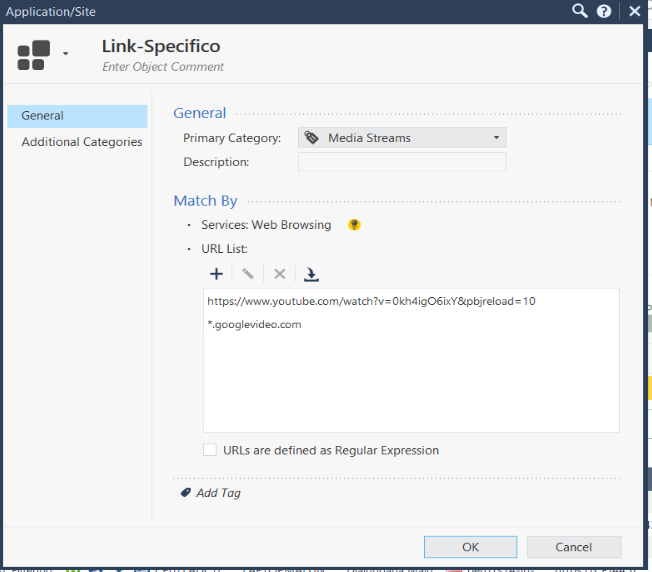
Apparently when creating a custom application/site, you must add also a URL with the wildcard for all the CDNs where the media is fecthed.
I used this expression "*.googlevideo.com".
After adding this URL into in the same configuration as the link of the specific youtube video that I wish to have access to, it finally started working as normal. And the remaining videos from Youtube was blocked.
DM
Hi there
after a couple of hours reading around the internet, I finally found the issue.
Apparently when creating a custom application/site, you must add also a URL with the wildcard for all the CDNs where the media is fecthed.
I used this expression "*.googlevideo.com".
After adding this URL into in the same configuration as the link of the specific youtube video that I wish to have access to, it finally started working as normal. And the remaining videos from Youtube was blocked.
DM
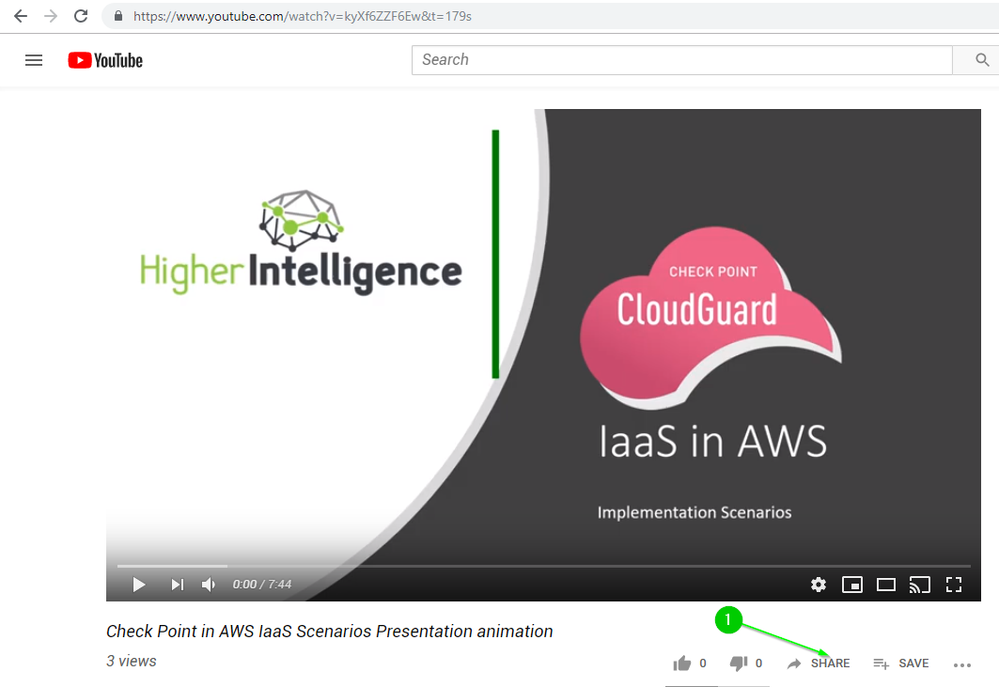
Try getting link this way:
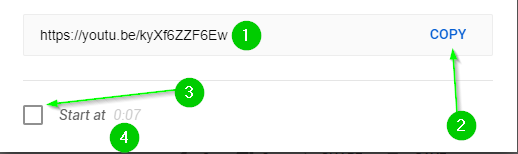
and make sure that the "Start from" is not checked:
Try getting link this way:
and make sure that the "Start from" is not checked:
Hi Vladimir
I tried this way, but still did not work.
See my post before this one.
Kind regards
Hi Vladimir
I tried this way, but still did not work.
See my post before this one.
Kind regards
@Di_Junior , this does not look like regular expression, just another URL with the wildcard.
Can you post the screencap of the *.googlevideo.com
@Di_Junior , this does not look like regular expression, just another URL with the wildcard.
Can you post the screencap of the *.googlevideo.com