- Products
- Learn
- Local User Groups
- Partners
- More

What's New in Check Point SASE
Wednesday, 9 September @ 5pm CET / 11am EDT
The State of Ransomware Q2 2026:
This Quarter's Trends, and Their Impact on Your Defenses
AI Security Masters
Implementing the AI Security Trifecta
CheckMates Go:
Half is Not Enough
Hello everybody,
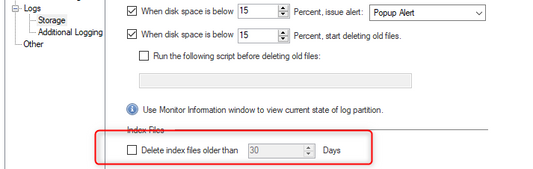
I would like to generate some security reports but I can generate reports with only 30 days retentions. I changed the option to do not delete the index files older than 30 days.
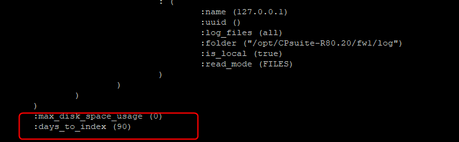
I follow the process as mentionned in the SK sk111766 and configured the ./log_indexer -days_to_index <NUM_OF_DAYS_TO_INDEX> to 90 days but nothing as changed when I generate a report.
If someone had the same issue and have find a solution ?
Regards,
Campos Miguel
Hello everybody,
I would like to generate some security reports but I can generate reports with only 30 days retentions. I changed the option to do not delete the index files older than 30 days.
I follow the process as mentionned in the SK sk111766 and configured the ./log_indexer -days_to_index <NUM_OF_DAYS_TO_INDEX> to 90 days but nothing as changed when I generate a report.
If someone had the same issue and have find a solution ?
Regards,
Campos Miguel
Hello everybody,
I would like to generate some security reports but I can generate reports with only 30 days retentions. I changed the option to do not delete the index files older than 30 days.
I follow the process as mentionned in the SK sk111766 and configured the ./log_indexer -days_to_index <NUM_OF_DAYS_TO_INDEX> to 90 days but nothing as changed when I generate a report.
If someone had the same issue and have find a solution ?
Regards,
Campos Miguel
Hello everybody,
I would like to generate some security reports but I can generate reports with only 30 days retentions. I changed the option to do not delete the index files older than 30 days.
I follow the process as mentionned in the SK sk111766 and configured the ./log_indexer -days_to_index <NUM_OF_DAYS_TO_INDEX> to 90 days but nothing as changed when I generate a report.
If someone had the same issue and have find a solution ?
Regards,
Campos Miguel
Hello everybody,
I would like to generate some security reports but I can generate reports with only 30 days retentions. I changed the option to do not delete the index files older than 30 days.
I follow the process as mentionned in the SK sk111766 and configured the ./log_indexer -days_to_index <NUM_OF_DAYS_TO_INDEX> to 90 days but nothing as changed when I generate a report.
If someone had the same issue and have find a solution ?
Regards,
Campos Miguel
Hello everybody,
I would like to generate some security reports but I can generate reports with only 30 days retentions. I changed the option to do not delete the index files older than 30 days.
I follow the process as mentionned in the SK sk111766 and configured the ./log_indexer -days_to_index <NUM_OF_DAYS_TO_INDEX> to 90 days but nothing as changed when I generate a report.
If someone had the same issue and have find a solution ?
Regards,
Campos Miguel
Hello everybody,
I would like to generate some security reports but I can generate reports with only 30 days retentions. I changed the option to do not delete the index files older than 30 days.
I follow the process as mentionned in the SK sk111766 and configured the ./log_indexer -days_to_index <NUM_OF_DAYS_TO_INDEX> to 90 days but nothing as changed when I generate a report.
If someone had the same issue and have find a solution ?
Regards,
Campos Miguel
Hello everybody,
I would like to generate some security reports but I can generate reports with only 30 days retentions. I changed the option to do not delete the index files older than 30 days.
I follow the process as mentionned in the SK sk111766 and configured the ./log_indexer -days_to_index <NUM_OF_DAYS_TO_INDEX> to 90 days but nothing as changed when I generate a report.
If someone had the same issue and have find a solution ?
Regards,
Campos Miguel

 Dror_Aharony
Dror_Aharony
Dror_Aharony
Dror_Aharony
Dror_Aharony
Dror_Aharony
Dror_Aharony
Dror_Aharony
Dror_Aharony
Dror_Aharony
Dror_Aharony
Dror_Aharony
Dror_Aharony
Hi chico,
to Index older log-files up-to 90 days, you look to have configured it properly, assuming you restarted the Indexer (stopIndexer; startIndexer or evstop;evstart).
You definitely have enough space to avoid the 'emergency' min maintenance, more than 15% of Logs=/var/log/ partition (if I see it properly on your pic)?
if still doesn't work, Email me with output of:
$RTDIR/scripts/doctor-log.sh
Dror Aharony ([email protected])
Hi chico,
to Index older log-files up-to 90 days, you look to have configured it properly, assuming you restarted the Indexer (stopIndexer; startIndexer or evstop;evstart).
You definitely have enough space to avoid the 'emergency' min maintenance, more than 15% of Logs=/var/log/ partition (if I see it properly on your pic)?
if still doesn't work, Email me with output of:
$RTDIR/scripts/doctor-log.sh
Dror Aharony ([email protected])
Hi chico,
to Index older log-files up-to 90 days, you look to have configured it properly, assuming you restarted the Indexer (stopIndexer; startIndexer or evstop;evstart).
You definitely have enough space to avoid the 'emergency' min maintenance, more than 15% of Logs=/var/log/ partition (if I see it properly on your pic)?
if still doesn't work, Email me with output of:
$RTDIR/scripts/doctor-log.sh
Dror Aharony ([email protected])
Hi chico,
to Index older log-files up-to 90 days, you look to have configured it properly, assuming you restarted the Indexer (stopIndexer; startIndexer or evstop;evstart).
You definitely have enough space to avoid the 'emergency' min maintenance, more than 15% of Logs=/var/log/ partition (if I see it properly on your pic)?
if still doesn't work, Email me with output of:
$RTDIR/scripts/doctor-log.sh
Dror Aharony ([email protected])
Hi chico,
to Index older log-files up-to 90 days, you look to have configured it properly, assuming you restarted the Indexer (stopIndexer; startIndexer or evstop;evstart).
You definitely have enough space to avoid the 'emergency' min maintenance, more than 15% of Logs=/var/log/ partition (if I see it properly on your pic)?
if still doesn't work, Email me with output of:
$RTDIR/scripts/doctor-log.sh
Dror Aharony ([email protected])
Hi chico,
to Index older log-files up-to 90 days, you look to have configured it properly, assuming you restarted the Indexer (stopIndexer; startIndexer or evstop;evstart).
You definitely have enough space to avoid the 'emergency' min maintenance, more than 15% of Logs=/var/log/ partition (if I see it properly on your pic)?
if still doesn't work, Email me with output of:
$RTDIR/scripts/doctor-log.sh
Dror Aharony ([email protected])
Hi chico,
to Index older log-files up-to 90 days, you look to have configured it properly, assuming you restarted the Indexer (stopIndexer; startIndexer or evstop;evstart).
You definitely have enough space to avoid the 'emergency' min maintenance, more than 15% of Logs=/var/log/ partition (if I see it properly on your pic)?
if still doesn't work, Email me with output of:
$RTDIR/scripts/doctor-log.sh
Dror Aharony ([email protected])
Hello Dror Aharony,
Thank you for your reply, I'm just restarted the indexer service but nothing changed. I find an another SK for run SmartEvent Offline Jobs for multiple logs "sk98894" but I don't understand the difference with the SK sk111766.
I send you the result from the doctor-log.sh
Thank you a lot for your feedback
Miguel
Hello Dror Aharony,
Thank you for your reply, I'm just restarted the indexer service but nothing changed. I find an another SK for run SmartEvent Offline Jobs for multiple logs "sk98894" but I don't understand the difference with the SK sk111766.
I send you the result from the doctor-log.sh
Thank you a lot for your feedback
Miguel
Hello Dror Aharony,
Thank you for your reply, I'm just restarted the indexer service but nothing changed. I find an another SK for run SmartEvent Offline Jobs for multiple logs "sk98894" but I don't understand the difference with the SK sk111766.
I send you the result from the doctor-log.sh
Thank you a lot for your feedback
Miguel
Hello Dror Aharony,
Thank you for your reply, I'm just restarted the indexer service but nothing changed. I find an another SK for run SmartEvent Offline Jobs for multiple logs "sk98894" but I don't understand the difference with the SK sk111766.
I send you the result from the doctor-log.sh
Thank you a lot for your feedback
Miguel
Hello Dror Aharony,
Thank you for your reply, I'm just restarted the indexer service but nothing changed. I find an another SK for run SmartEvent Offline Jobs for multiple logs "sk98894" but I don't understand the difference with the SK sk111766.
I send you the result from the doctor-log.sh
Thank you a lot for your feedback
Miguel
Hello Dror Aharony,
Thank you for your reply, I'm just restarted the indexer service but nothing changed. I find an another SK for run SmartEvent Offline Jobs for multiple logs "sk98894" but I don't understand the difference with the SK sk111766.
I send you the result from the doctor-log.sh
Thank you a lot for your feedback
Miguel
Hello Dror Aharony,
Thank you for your reply, I'm just restarted the indexer service but nothing changed. I find an another SK for run SmartEvent Offline Jobs for multiple logs "sk98894" but I don't understand the difference with the SK sk111766.
I send you the result from the doctor-log.sh
Thank you a lot for your feedback
Miguel