- Products
- Learn
- Local User Groups
- Partners
- More

What's New in Check Point SASE
Wednesday, 9 September @ 5pm CET / 11am EDT
The State of Ransomware Q2 2026:
This Quarter's Trends, and Their Impact on Your Defenses
AI Security Masters
Implementing the AI Security Trifecta
CheckMates Go:
Half is Not Enough
To give another example, I present the following GW object, which has the following interfaces defined:
I used the following mgmt_cli command:
mgmt_cli -r true set simple-gateway name "R8120-GW" interfaces.1.name "eth0" interfaces.1.ipv4-address "10.6.5.210" interfaces.1.ipv4-network-mask "255.255.255.0" interfaces.1.topology "external" interfaces.2.name "eth1" interfaces.2.ipv4-address "192.168.100.1" interfaces.2.ipv4-network-mask "255.255.255.0" interfaces.2.topology "internal" interfaces.2.topology-settings.ip-address-behind-this-interface "network defined by the interface ip and net mask" interfaces.3.name "eth2" interfaces.3.ipv4-address "192.168.200.1" interfaces.3.ipv4-network-mask "255.255.255.0" interfaces.3.topology "internal" interfaces.3.topology-settings.ip-address-behind-this-interface "network defined by the interface ip and net mask"
The end result:
Note that you might need to pass more parameters to set the interfaces per your specifications.
However, that should be more than enough to get you started.
Yes, and this problem is addressed in R82 with the add-interface endpoint.
Continuing with the above object, let's say I wanted to add eth3.
My call would look something like this:
mgmt_cli -r true add interface name "eth3" gateway-uid "375bebfe-989b-4cd8-80c0-001d2736ccc1" ipv4-address "192.168.150.1" ipv4-mask-length "24" security-zone-settings.auto-calculated "false" security-zone-settings.specific-zone "WirelessZone" topology "internal" topology-settings.ip-address-behind-this-interface "network defined by the interface ip and net mask"
It looks something like this in SmartConsole:
FYI @Omer_Kleinstern when I tried to use ipv4-network-mask instead of ipv4-mask-length in the above, I got a validation error.
I assume this a bug?
Also, it seems that there is no option in the add-interface endpoint (or the set-interface one) to actually enable the specified security zone.
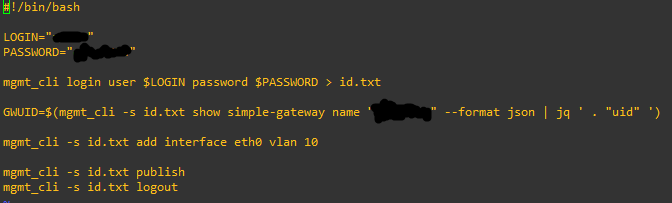
You're doing this from SmartConsole CLI, which is not where you need to enter this command.
Log into the gateway via SSH/console.
Thanks for your reply, I used this script to add vlan but it show me the error. Can you check my script and guide me how to do it.
Thanks for your reply, I used this script to add vlan but it show me the error. Can you check my script and guide me how to do it.
Can you make it more clearly? When I use set simple-gateway with my gateway uid, I have parameter interfaces.i. I tried set simple-gateway uid "UID" interfaces.i. ... and it always show error.
I just want to add vlan sub-interfaces, Im using R81.20. When I log into the gateway via console. I use "add interface eth0 vlan 10" and some "set interface ...", it work. I want to try to do it with expert mode (mgmt_cli) to add multiple vlans at once. Can I do it on R81.20?
Can you make it more clearly? When I use set simple-gateway with my gateway uid, I have parameter interfaces.i. I tried set simple-gateway uid "UID" interfaces.i. ... and it always show error.
I just want to add vlan sub-interfaces, Im using R81.20. When I log into the gateway via console. I use "add interface eth0 vlan 10" and some "set interface ...", it work. I want to try to do it with expert mode (mgmt_cli) to add multiple vlans at once. Can I do it on R81.20?
As stated, you cannot just "add" an interfaces to an existing simple-gateway object.
Your API call must include ALL the interfaces (both existing and ones you wish to add).
This is specified in the API documentation:
See this thread for an example: https://community.checkpoint.com/t5/Management/How-to-Set-topology-on-a-simple-gateway-using-the-mgm...
As stated, you cannot just "add" an interfaces to an existing simple-gateway object.
Your API call must include ALL the interfaces (both existing and ones you wish to add).
This is specified in the API documentation:
See this thread for an example: https://community.checkpoint.com/t5/Management/How-to-Set-topology-on-a-simple-gateway-using-the-mgm...
To give another example, I present the following GW object, which has the following interfaces defined:
I used the following mgmt_cli command:
mgmt_cli -r true set simple-gateway name "R8120-GW" interfaces.1.name "eth0" interfaces.1.ipv4-address "10.6.5.210" interfaces.1.ipv4-network-mask "255.255.255.0" interfaces.1.topology "external" interfaces.2.name "eth1" interfaces.2.ipv4-address "192.168.100.1" interfaces.2.ipv4-network-mask "255.255.255.0" interfaces.2.topology "internal" interfaces.2.topology-settings.ip-address-behind-this-interface "network defined by the interface ip and net mask" interfaces.3.name "eth2" interfaces.3.ipv4-address "192.168.200.1" interfaces.3.ipv4-network-mask "255.255.255.0" interfaces.3.topology "internal" interfaces.3.topology-settings.ip-address-behind-this-interface "network defined by the interface ip and net mask"
The end result:
Note that you might need to pass more parameters to set the interfaces per your specifications.
However, that should be more than enough to get you started.
To give another example, I present the following GW object, which has the following interfaces defined:
I used the following mgmt_cli command:
mgmt_cli -r true set simple-gateway name "R8120-GW" interfaces.1.name "eth0" interfaces.1.ipv4-address "10.6.5.210" interfaces.1.ipv4-network-mask "255.255.255.0" interfaces.1.topology "external" interfaces.2.name "eth1" interfaces.2.ipv4-address "192.168.100.1" interfaces.2.ipv4-network-mask "255.255.255.0" interfaces.2.topology "internal" interfaces.2.topology-settings.ip-address-behind-this-interface "network defined by the interface ip and net mask" interfaces.3.name "eth2" interfaces.3.ipv4-address "192.168.200.1" interfaces.3.ipv4-network-mask "255.255.255.0" interfaces.3.topology "internal" interfaces.3.topology-settings.ip-address-behind-this-interface "network defined by the interface ip and net mask"
The end result:
Note that you might need to pass more parameters to set the interfaces per your specifications.
However, that should be more than enough to get you started.
I see, so every time I add interface, I need to define the old interface and the new interface. I find that quite inconvenient. For example, if I already have 10 interfaces and want to add 10 new interfaces, I will use an API call for 20 interfaces. However, thanks for the helpful solution.
I see, so every time I add interface, I need to define the old interface and the new interface. I find that quite inconvenient. For example, if I already have 10 interfaces and want to add 10 new interfaces, I will use an API call for 20 interfaces. However, thanks for the helpful solution.
Yes, and this problem is addressed in R82 with the add-interface endpoint.
Continuing with the above object, let's say I wanted to add eth3.
My call would look something like this:
mgmt_cli -r true add interface name "eth3" gateway-uid "375bebfe-989b-4cd8-80c0-001d2736ccc1" ipv4-address "192.168.150.1" ipv4-mask-length "24" security-zone-settings.auto-calculated "false" security-zone-settings.specific-zone "WirelessZone" topology "internal" topology-settings.ip-address-behind-this-interface "network defined by the interface ip and net mask"
It looks something like this in SmartConsole:
FYI @Omer_Kleinstern when I tried to use ipv4-network-mask instead of ipv4-mask-length in the above, I got a validation error.
I assume this a bug?
Also, it seems that there is no option in the add-interface endpoint (or the set-interface one) to actually enable the specified security zone.
Yes, and this problem is addressed in R82 with the add-interface endpoint.
Continuing with the above object, let's say I wanted to add eth3.
My call would look something like this:
mgmt_cli -r true add interface name "eth3" gateway-uid "375bebfe-989b-4cd8-80c0-001d2736ccc1" ipv4-address "192.168.150.1" ipv4-mask-length "24" security-zone-settings.auto-calculated "false" security-zone-settings.specific-zone "WirelessZone" topology "internal" topology-settings.ip-address-behind-this-interface "network defined by the interface ip and net mask"
It looks something like this in SmartConsole:
FYI @Omer_Kleinstern when I tried to use ipv4-network-mask instead of ipv4-mask-length in the above, I got a validation error.
I assume this a bug?
Also, it seems that there is no option in the add-interface endpoint (or the set-interface one) to actually enable the specified security zone.