- Products
- Learn
- Local User Groups
- Partners
- More
MVP 2026: Submissions
Are Now Open!
What's New in R82.10?
Watch NowOverlap in Security Validation
Help us to understand your needs better
CheckMates Go:
Maestro Madness
Hi There,
When creating exceptions thinking of performance:
is it best to create an empty profile and assign your exceptions (say Office365 for example) to a rule with the empty profile, or would a "Global exception" work all the same?
According to MaxPower in earlier versions Empty profile would be more efficient. Is that still the same?
Examples
Exception with empty profile:
empty profile
vs
global exception:
global exception
Thanks
Your question is covered by the new 2-day Check Point Threat Prevention Specialist class which was just released to the ATCs this week.
Your first example will exempt all matching traffic from any Threat Prevention deep inspection whatsoever and improve performance at the cost of security. This approach is also called a "null profile". The only thing to watch out for here is that if you have more than one Threat Prevention layer (not common), you need to ensure the null profile rule appears at the top of all TP layers.
The other option is to do a blade-based global exception like this which will achieve exactly the same effect (include Zero Phishing if you are on R81.20+):
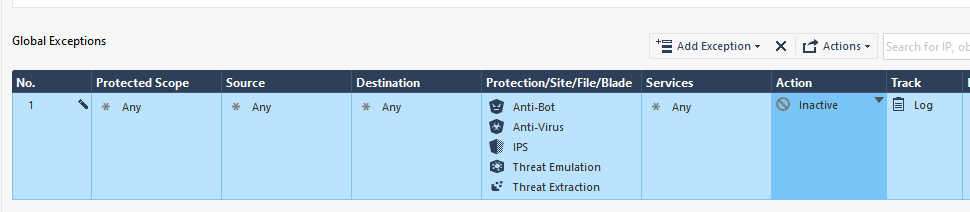
In my opinion this would be the preferred technique as the global exception will apply across all TP layers, it keeps your main TP policy concise, and is a little easier to understand.
However your example of leaving Protection/Site/File/Blade as "N/A" in the exception I'm not completely sure about. Inactive does not always mean what you think it means, if you put a signature/protection in Protection/Site/File/Blade and set the action to Inactive, the firewall is still expending the overhead to find that signature but just ignoring it if it is found. I'll have to test leaving it at N/A in my Gateway Performance Optimization Class lab and update the thread. But I know for sure the blade-based exception shown above will do what you want.
Your question is covered by the new 2-day Check Point Threat Prevention Specialist class which was just released to the ATCs this week.
Your first example will exempt all matching traffic from any Threat Prevention deep inspection whatsoever and improve performance at the cost of security. This approach is also called a "null profile". The only thing to watch out for here is that if you have more than one Threat Prevention layer (not common), you need to ensure the null profile rule appears at the top of all TP layers.
The other option is to do a blade-based global exception like this which will achieve exactly the same effect (include Zero Phishing if you are on R81.20+):
In my opinion this would be the preferred technique as the global exception will apply across all TP layers, it keeps your main TP policy concise, and is a little easier to understand.
However your example of leaving Protection/Site/File/Blade as "N/A" in the exception I'm not completely sure about. Inactive does not always mean what you think it means, if you put a signature/protection in Protection/Site/File/Blade and set the action to Inactive, the firewall is still expending the overhead to find that signature but just ignoring it if it is found. I'll have to test leaving it at N/A in my Gateway Performance Optimization Class lab and update the thread. But I know for sure the blade-based exception shown above will do what you want.
Yeah I just tried it in my lab with R81.20, and leaving "N/A" in the Protection/Site/File/Blade cell of a global exception does not work at all: medium path inspection overhead is still expended by TP, and all TP protections/signatures are fully enforced. I'm assuming this is because N/A is being treated as the equivalent of "None" in that cell which is required for matching, which means the exception never matches anything at all. There probably should be a policy installation or popup/tooltip warning about this situation but there isn't.
Thank you Tim! Legend
Tue 16 Dec 2025 @ 05:00 PM (CET)
Under the Hood: CloudGuard Network Security for Oracle Cloud - Config and Autoscaling!Thu 18 Dec 2025 @ 10:00 AM (CET)
Cloud Architect Series - Building a Hybrid Mesh Security Strategy across cloudsTue 16 Dec 2025 @ 05:00 PM (CET)
Under the Hood: CloudGuard Network Security for Oracle Cloud - Config and Autoscaling!Thu 18 Dec 2025 @ 10:00 AM (CET)
Cloud Architect Series - Building a Hybrid Mesh Security Strategy across cloudsAbout CheckMates
Learn Check Point
Advanced Learning
YOU DESERVE THE BEST SECURITY
