- Products
- Learn
- Local User Groups
- Partners
- More

MVP 2026: Submissions
Are Now Open!
What's New in R82.10?
10 December @ 5pm CET / 11am ET
Announcing Quantum R82.10!
Learn MoreOverlap in Security Validation
Help us to understand your needs better
CheckMates Go:
Maestro Madness
I have tested a lot in the lab with vsx and affinity over the last days. Now a question has come up which I cannot explain 100%.
Way 1:
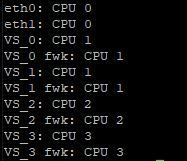
When I search the internet, they all say that the CoreXL instances must be assigned to the Core's. Typical assignment:
fw ctl affinity -s -d -vsid 0 -cpu 1
fw ctl affinity -s -d -vsid 1 -cpu 1
fw ctl affinity -s -d -vsid 2 -cpu 2
fw ctl affinity -s -d -vsid 3 -cpu 3
After that my affinity looks like this:
Way 2:
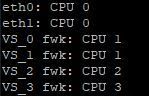
From my point of view, it would be better to distribute the fwk process to the cores as well. For this purpose I have set the following:
fw ctl affinity -s -d -pname fwk -vsid 0 -cpu 1
fw ctl affinity -s -d -pname fwk -vsid 1 -cpu 1
fw ctl affinity -s -d -pname fwk -vsid 2 -cpu 2
fw ctl affinity -s -d -pname fwk -vsid 3 -cpu 3
Here the affinity looks as follows:
Now the question arises for me, which of the two ways is the better one?
PS:
Top shows the fwkX processes:
A small calculation sample for the utilization of process fwkX:
- fwk0_X -> fw instance thread that takes care for the packet processing
- fwk0_dev_X -> the thread that takes care for communication between fw instances and other CP daemons
- fwk0_kissd -> legacy Kernel Infrastructure (obsolete)
- fwk0_hp -> (high priority) cluster thread
As far as I am concerned, the last second option is not required. Affinity for FWK is handled by the first approach automatically. US affinity with pname is for other processes.
In the user space firewall, this is basically a process that now calls several threads that work on several cores. It just brought up my question. I did the same with all my VSX installations as you described in the history.
Here an example from the LAB:
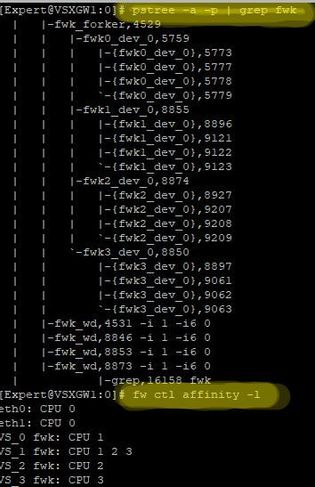
Test 1:
# fw ctl affinity -s -d -pname fwk -vsid 0 -cpu 1
# fw ctl affinity -s -d -pname fwk -vsid 1 -cpu 1-3
# fw ctl affinity -s -d -pname fwk -vsid 2 -cpu 2
# fw ctl affinity -s -d -pname fwk -vsid 3 -cpu 3
# reboot
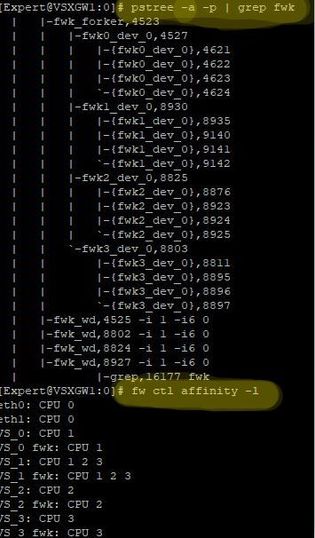
Test 2:
# fw ctl affinity -s -d -vsid 0 -cpu 1
# fw ctl affinity -s -d -vsid 1 -cpu 1-3
# fw ctl affinity -s -d -vsid 2 -cpu 2
# fw ctl affinity -s -d -vsid 3 -cpu 3
# reboot
When you do research here at LAB, even more amazing things come out. No matter which command I use, the instances always remain the same on Linux level. At the process level, I can't see any difference. See pictures above. I have a system with 4 cores and all instances are assigned to all cores on process level. Whether I change the affinity with one or the other command here.
I would expect to see even one thread process if I set only one over the affinity. I don't understand that. Hmmmm
Hi @PhoneBoy ,
With R80.40 this would be a logical explanation.
But it is an R80.30 VSX LS cluster.
2.6 kernel
Leaderboard
Epsum factorial non deposit quid pro quo hic escorol.
| User | Count |
|---|---|
| 24 | |
| 20 | |
| 9 | |
| 6 | |
| 5 | |
| 5 | |
| 5 | |
| 5 | |
| 4 | |
| 4 |
Fri 12 Dec 2025 @ 10:00 AM (CET)
Check Mates Live Netherlands: #41 AI & Multi Context ProtocolTue 16 Dec 2025 @ 05:00 PM (CET)
Under the Hood: CloudGuard Network Security for Oracle Cloud - Config and Autoscaling!Fri 12 Dec 2025 @ 10:00 AM (CET)
Check Mates Live Netherlands: #41 AI & Multi Context ProtocolTue 16 Dec 2025 @ 05:00 PM (CET)
Under the Hood: CloudGuard Network Security for Oracle Cloud - Config and Autoscaling!Thu 18 Dec 2025 @ 10:00 AM (CET)
Cloud Architect Series - Building a Hybrid Mesh Security Strategy across cloudsAbout CheckMates
Learn Check Point
Advanced Learning
YOU DESERVE THE BEST SECURITY