- Products
- Learn
- Local User Groups
- Partners
- More

MVP 2026: Submissions
Are Now Open!
What's New in R82.10?
Watch NowOverlap in Security Validation
Help us to understand your needs better
CheckMates Go:
Maestro Madness
Hi,
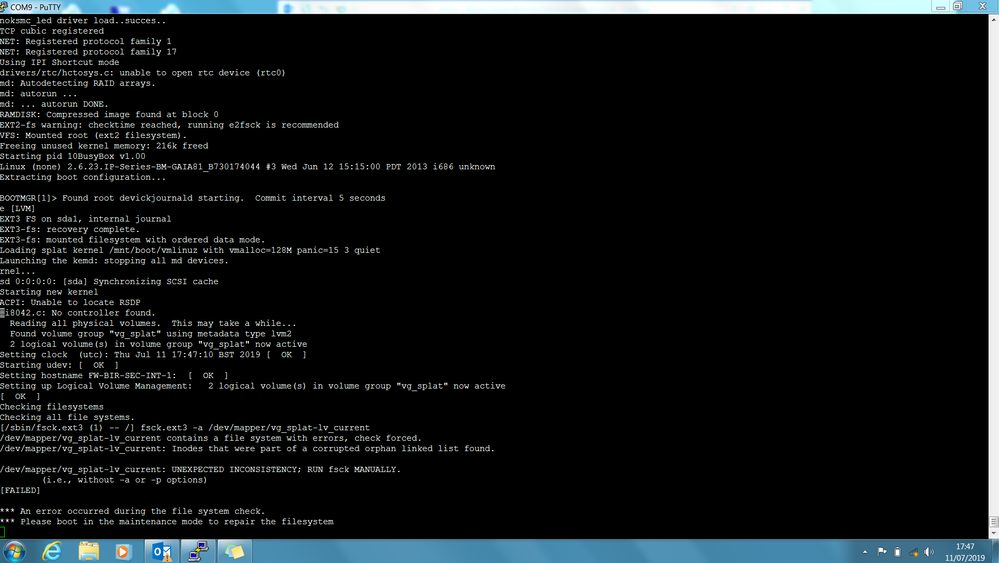
after rebooting the primary in XL cluster , I got the below message:
*** please reboot in the maintenance mode to repair filesystem
when I rebooted the firewall , can't see "press any key to see boot menu " . I read it could be defaulted to 0 second.
is there is thing I can do ? any advice is highly appreciated .
Hi Mazin,
Try the following:
1) Log into the device and navigate to expert mode.
2) Edit the /boot/grub/menu.1st and change its timeout parameter from 0 to 4. Save the changes.
3) Reboot the machine.
4) Press a key on the "Press any key to see the boot menu" screen. This should open the Check Point Boot Menu.
5) Choose the "Start in maintenance mode".
6) Enter the Expert mode credentials.
7) Follow sk92442 to repair the filesystem.
I hope that helps.
Hi Mazin,
Try the following:
1) Log into the device and navigate to expert mode.
2) Edit the /boot/grub/menu.1st and change its timeout parameter from 0 to 4. Save the changes.
3) Reboot the machine.
4) Press a key on the "Press any key to see the boot menu" screen. This should open the Check Point Boot Menu.
5) Choose the "Start in maintenance mode".
6) Enter the Expert mode credentials.
7) Follow sk92442 to repair the filesystem.
I hope that helps.
thanks for your reply Nick, but how can I login to the device and the boot is stuck there ?
Only FYI R77.10 is out of support. Therefore it is not possible to open a TAC ticket.
If it is still possible to log in please follow this link:
How to check the hard drive integrity in Gaia/SecurePlatform OS with the 'fsck' command.
If you can't login any more use this HDT:
Using the Check Point Appliance Hardware Diagnostic Tool
If the hard disk is still ok then install a backup or snapshot.
Looks like HDD failure to me
Hi,
Its running Gaia, below the screenshot :-
Hi All
Was this ever resolved,
I have the exact same issue with my 80.10 gateway.
1) Log into the device and navigate to expert mode.
2) Edit the /boot/grub/menu.1st and change its timeout parameter from 0 to 4. Save the changes.
3) Reboot the machine.
4) Press a key on the "Press any key to see the boot menu" screen. This should open the Check Point Boot Menu.
5) Choose the "Start in maintenance mode".
6) Enter the Expert mode credentials.
7) Follow sk92442 to repair the filesystem.
Leaderboard
Epsum factorial non deposit quid pro quo hic escorol.
| User | Count |
|---|---|
| 20 | |
| 20 | |
| 16 | |
| 8 | |
| 7 | |
| 3 | |
| 3 | |
| 3 | |
| 3 | |
| 3 |
Fri 12 Dec 2025 @ 10:00 AM (CET)
Check Mates Live Netherlands: #41 AI & Multi Context ProtocolTue 16 Dec 2025 @ 05:00 PM (CET)
Under the Hood: CloudGuard Network Security for Oracle Cloud - Config and Autoscaling!Fri 12 Dec 2025 @ 10:00 AM (CET)
Check Mates Live Netherlands: #41 AI & Multi Context ProtocolTue 16 Dec 2025 @ 05:00 PM (CET)
Under the Hood: CloudGuard Network Security for Oracle Cloud - Config and Autoscaling!About CheckMates
Learn Check Point
Advanced Learning
YOU DESERVE THE BEST SECURITY