- Products
- Learn
- Local User Groups
- Partners
- More

What's New in R82.10?
Register HereWhen the Agents Attack
A Live Look at Agentic Exposure Validation
AI Security Masters E8:
Claude Mythos: New Era in Cyber Security
CheckMates Go:
CheckMates Fest
Hi all.
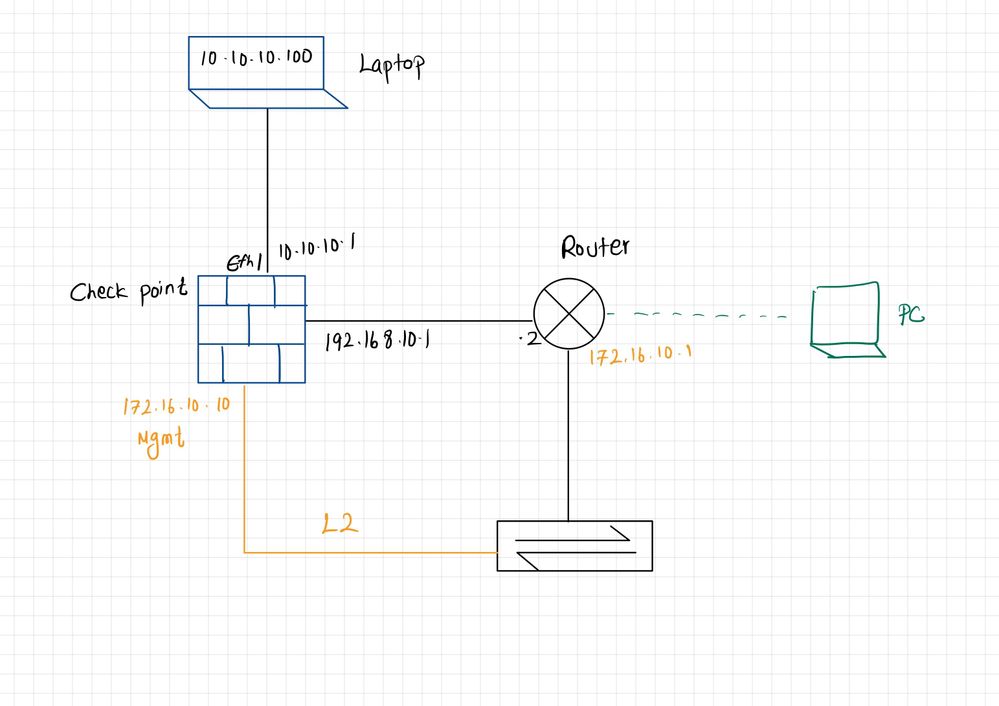
I recently made the change to enable management plane separation following sk138672. After the change, I noticed something I don't understand. Attached you will find a diagram that represents the network.
If I connect (ssh, https) from the PC (green) the traffic goes to the check point management interface directly and no issues. The traffic goes directly into the management interface and doesn't have to traverse the check point data plane.
If I, however, connect from the laptop (shown as black on top of the diagram) from a different network, I'm getting a connection refused from the firewall. My understanding is that the data plane and management plane are totally isolated so, the traffic should follow the following path.
Laptop > check point (eth1) > Router > check point management interface. However, it doesn't work at the moment. I already have a firewall policy to allow the connections. (Check point has a static route for 172.16.10.0/24 pointing to the Router)
If I check the data plane routing table, it has an entry for 172.16.10.10/32 shown as mdps_tun. Does that mean the traffic is not forwarded to the router?
C 172.16.10.10/32 is directly connected, mdps_tun
Thanks in advance.
This is the expected behaviour if you enabled the management plane. Any your question is?
Thanks for the response. When you say expected behaviour, does that mean the firewall 'won't' allow traffic crossing from the data plane to the management plane even via a different path? (not directly crossing between the planes)
My question is, why the check point just doesn't send the traffic to the next hop which is the router?
No, it does not mean that. You need to run some traces to see if the traffic from production plane to MGMT interface is dropped, and go from there. It is not enough info here to say why it happens.
Thanks, I will get in touch with the support to investigate further.
That would be a good idea
HI vsurresh, have you opened a case? I have also different problem with the mplane when it need to reach a network via the dplane.
the flow is blocked by the ANti Spoofing because it detect this is a local ip address. I have disabled the local antispoofing but the log is not anymore presented but the mplane don't get any response.
and I have another problematic to manage the NAT, because the Nat configuration is global and not by plane.
I think the better way to have a plan separation is to use the VSX.
Hi,
Were u able to resolve this?
Hi there,
I have the same issue. The configuration is very similar and on dataplane I have the route to the network where Mgmt interface (on mplane) is connected.
If I ping the IP of MGMT from Laptop: traffic access on dataplane but don't go out from it. Strange behavior is that it works.
If i try ssh to the IP of MGMT from Laptop traffic follow the same path but I have a reset maybe because sshd is on mplane binded.
R81.20 JHR 84 for my environment.
Did you solve it in some way?
Did you ever get a proper solution to this issue? I have a similar topology, and am unable to pass traffic to/from the management interface once the management network's connectivity is handled by the Checkpoint FW itself. (Converting from another FW brand) Mgmt-initiated traffic fails when the first packet hits a dplane interface with an extended anti-spoofing hit. Inbound traffic to Mgmt from elsewhere takes the first packet arriving on a dplane interface thru the back door via that "mdps_tun" route, and then the outbound reply from mplane/Mgmt breaks flow symmetry and dies. Wondering if there's any legitimate reason for mdps_tun to exist at all and if there's any way to get rid of it but keep the rest of MDPS.
Leaderboard
Epsum factorial non deposit quid pro quo hic escorol.
| User | Count |
|---|---|
| 26 | |
| 5 | |
| 5 | |
| 5 | |
| 5 | |
| 4 | |
| 4 | |
| 3 | |
| 3 | |
| 3 |
Tue 23 Jun 2026 @ 05:00 PM (CEST)
Under the Hood: Check Point Cloud Firewall | Securing all of your clouds: Art of the possibleThu 25 Jun 2026 @ 10:00 AM (PDT)
AI Security Masters E10: READY OR NOT: Securing the AI Enterprise 2/5 - AI Red TeamingThu 02 Jul 2026 @ 06:00 PM (CST)
Revolucionando la Seguridad con IA Generativa: Prevención Inteligente en Tiempo RealThu 09 Jul 2026 @ 11:00 AM (CEST)
The Cloud Architects Series: Check Point Edge Protection SD-WAN & SASETue 14 Jul 2026 @ 10:00 AM (PDT)
AI Security Masters E11: READY OR NOT: Securing the AI Enterprise 3/5 - AI Workforce SecurityTue 23 Jun 2026 @ 05:00 PM (CEST)
Under the Hood: Check Point Cloud Firewall | Securing all of your clouds: Art of the possibleThu 25 Jun 2026 @ 10:00 AM (PDT)
AI Security Masters E10: READY OR NOT: Securing the AI Enterprise 2/5 - AI Red TeamingTue 14 Jul 2026 @ 10:00 AM (PDT)
AI Security Masters E11: READY OR NOT: Securing the AI Enterprise 3/5 - AI Workforce SecurityThu 30 Jul 2026 @ 10:00 AM (PDT)
AI Security Masters E12: READY OR NOT: Securing the AI Enterprise 4/5 - AI GatewayThu 20 Aug 2026 @ 10:00 AM (PDT)
AI Security Masters E13: READY OR NOT: Securing the AI Ent 5/5 - AI Research & Threat LandscapeThu 02 Jul 2026 @ 06:00 PM (CST)
Revolucionando la Seguridad con IA Generativa: Prevención Inteligente en Tiempo RealAbout CheckMates
Learn Check Point
Advanced Learning
YOU DESERVE THE BEST SECURITY