- Products
- Learn
- Local User Groups
- Partners
- More

MVP 2026: Submissions
Are Now Open!
What's New in R82.10?
10 December @ 5pm CET / 11am ET
Announcing Quantum R82.10!
Learn MoreOverlap in Security Validation
Help us to understand your needs better
CheckMates Go:
Maestro Madness
Dear
My gateway is 1550,enable remote access vpn,version is R80.20.25 (992002077)
Several users give feedbacks said that the vpn client auto disconnected after 20 seconds,the reason is that vpn client assigned a wrong office mode ip address ,the address segment is not the ip segment i configred .I found a sk said that "vpn ipafile_check $FWDIR/conf/ipassignment.conf detail" more than1024 users , but there is only 65 users:
Line 0059 ignored because it is empty
Line 0060 ignored because it is empty
Line 0061 is a comment (starts with #)
Line 0062 is a comment (starts with #)
Line 0063 is a comment (starts with #)
Line 0064 is a comment (starts with #)
Line 0065 ignored because it is empty
Could not read line 66 in conf file - maybe EOF
I can not find the root case, ple help,thanks!
That's consistent with users installing the client as SecuRemote, which does NOT support Office Mode.
If they reinstall and choose Check Point Mobile, it should work.
Is this a locally managed SMB appliance?
If so, I don’t believe this works.
It does work on centrally managed ones, or should.
Regardless, I would open a TAC case.
This is locally managed SMB appliance.Less than 20 users.
I would trust what phoneboy says, as he is Check Point God :). Anyway, not sure if this ever worked for you, but I know specifically for 20 seconds disconnect issue, I recall TAC always used to recommend to check option under gateway properties, vpn -> office mode and then 'support multiple external interfaces" or something like that, cant recall now. But, maybe open TAC case, does not hurt to confirm for sure.
I have just only one ISP link.
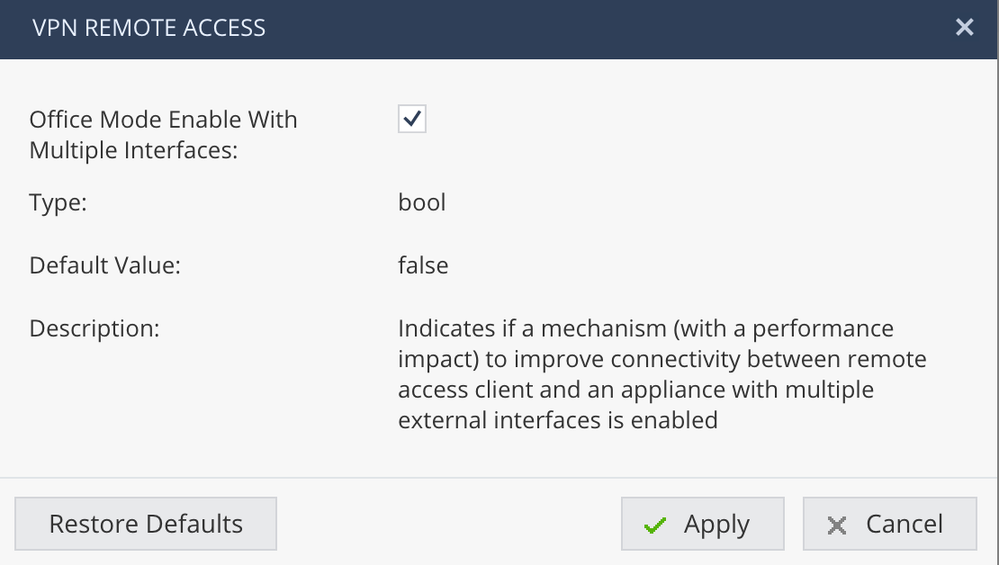
I also try to enable multiple interfaces in office mode,as following:
Even though I enable this feature,but still no working,I still assigned wrong office mode ip segment that is not what I configured
So what subnet is the office mode and what IP addresses are the users getting?
configured office mode ip :172.16.10.0/24
users getting ip : 192.168.0.0/24
That's consistent with users installing the client as SecuRemote, which does NOT support Office Mode.
If they reinstall and choose Check Point Mobile, it should work.
I was just about to write what @PhoneBoy said...is it possible users are installing securemote? You can have them check by right clicking the vpn icon, help and then about, see what it shows. I dont know much about locally managed SMB appliances, but hard to imagine office mode would not work.
SMB appliances include a certain number of remote access clients similar to Mobile Access Blade without the web-based portal.
Yes, it supports Office Mode 🙂
Leaderboard
Epsum factorial non deposit quid pro quo hic escorol.
| User | Count |
|---|---|
| 4 | |
| 3 | |
| 2 | |
| 1 | |
| 1 | |
| 1 | |
| 1 | |
| 1 |
Fri 12 Dec 2025 @ 10:00 AM (CET)
Check Mates Live Netherlands: #41 AI & Multi Context ProtocolTue 16 Dec 2025 @ 05:00 PM (CET)
Under the Hood: CloudGuard Network Security for Oracle Cloud - Config and Autoscaling!Fri 12 Dec 2025 @ 10:00 AM (CET)
Check Mates Live Netherlands: #41 AI & Multi Context ProtocolTue 16 Dec 2025 @ 05:00 PM (CET)
Under the Hood: CloudGuard Network Security for Oracle Cloud - Config and Autoscaling!About CheckMates
Learn Check Point
Advanced Learning
YOU DESERVE THE BEST SECURITY