- Products
- Learn
- Local User Groups
- Partners
- More

AI Security Masters E7:
How CPR Broke ChatGPT's Isolation and What It Means for You
Call For Papers
Your Expertise. Our Stage
Good, Better, Best:
Prioritizing Defenses Against Credential Abuse
Ink Dragon: A Major Nation-State Campaign
Watch HereCheckMates Go:
CheckMates Fest
Hey gang.
Is there a way to see when a source NET gets blocked via the SmartEvent automatic action rule "Block source"?
We have it set for a 10 minute block and I'd like to see the logs that show this.
Thank you!
-Joe
Hey brother,
I would call TAC and see if they can provide quick answer via remote. I think in smart console, not certain what filter can be used for that, as its not technically "searchable" by blade itself.
Best,
Andy
This adds a SAM rule. You can watch SAM rules in SmartView Monitor and there's also syntax for GWs to show SAM policy (found this: https://sc1.checkpoint.com/documents/R81/WebAdminGuides/EN/CP_R81_Multi-DomainSecurityManagement_Adm...).
@Amir_Senn I can never remember, will try it later in the lab...adding sam rules does not need policy install, right?
Best,
Andy
Correct
Thats what I thought...thanks!
Good morning Amir and thank you.
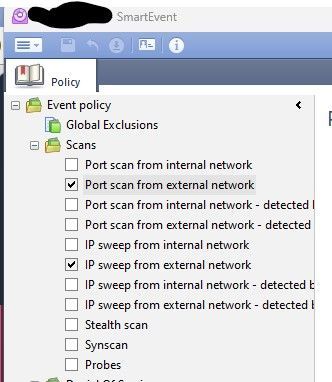
I've set two rules under "Scans" as you can see using SmartEvent. The automatic actions are email and block source. See Pic:
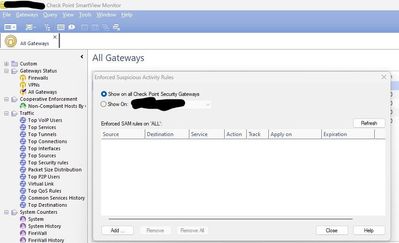
When I go into SmartView Monitor there are no rules active:
Any ideas about what may be wrong?
Thanks again!
Hey brother,
I could be mistaken when I say this, but Im fairly positive blocking those settings in smart event does NOT add any entries in SAM rules portion.
Also, question for @Amir_Senn ...sorry to hit you with so many ?s, apologies, but just curious, is there a way to say add bulk of IPs in sv monitor for sam rules, ie import csv file rather than keep adding entries manually? I checked all the settings, but does not appear that might be possible...
Best,
Andy
Thanks Andy. So the rules I added are not SAM rules or...they are but not shown in SmartView Monitor (if that's the case that's confusing no?)
From the link I published before, the syntax for adding a rule is this:
fw [-d] sam_policy add [-u] -a {d|n|b} [-l {r|a}] [-t <Timeout>] [-f <Target>] [-n <"Rule Name">] [-c <"Rule Comment">] [-o <"Rule Originator">] [-z "<Zone>"] ip <IP Filter Arguments>
I think that even a bash script can be easily implemented here.
Every IP has it's own row, with a loop according to the number of rows in the file. If you want all settings to be the same you can just insert IP in appropriate place in the command. Additional fields will require additional columns in the file.
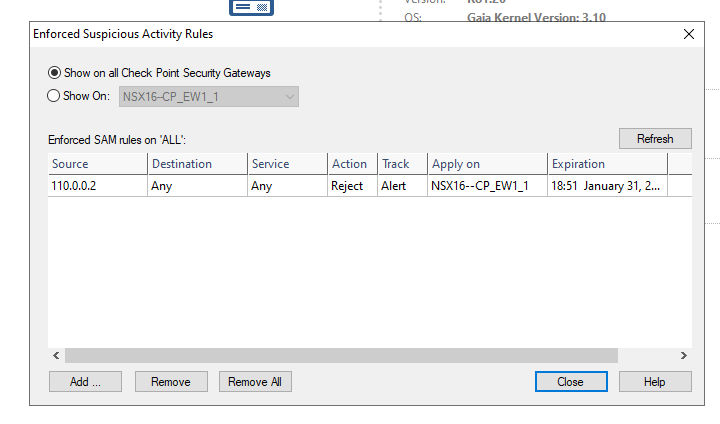
Definitely adds SAM rule. Here's an example I just did in my lab:
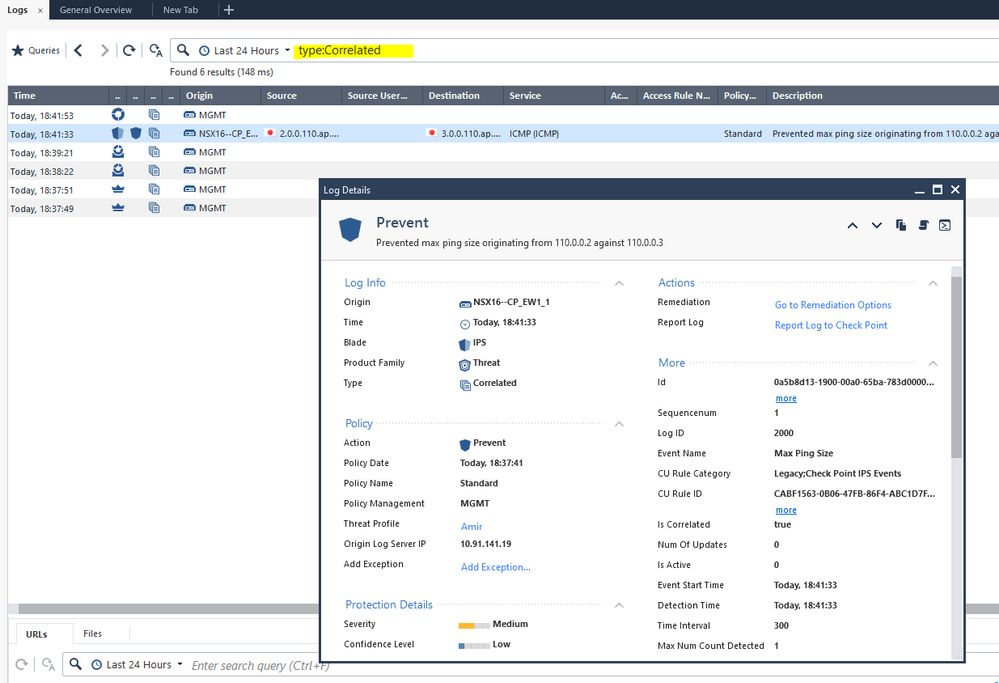
If you don't see a rule there I would say the thing to check is that the event you selected was matched. Best way to see is if a correlated event log was created:
I would also suggest using Infinity Playblocks which is a much more advanced and modern solution.
You will be able to view the relevant logs because they are associated with an Ordered Layer associated with Playblocks.
https://www.checkpoint.com/infinity/playblocks/
Leaderboard
Epsum factorial non deposit quid pro quo hic escorol.
| User | Count |
|---|---|
| 67 | |
| 26 | |
| 13 | |
| 12 | |
| 12 | |
| 9 | |
| 8 | |
| 8 | |
| 8 | |
| 7 |
Tue 21 Apr 2026 @ 05:00 PM (IDT)
AI Security Masters E7: How CPR Broke ChatGPT's Isolation and What It Means for YouTue 28 Apr 2026 @ 06:00 PM (IDT)
Under the Hood: Securing your GenAI-enabled Web Applications with Check Point WAFTue 21 Apr 2026 @ 05:00 PM (IDT)
AI Security Masters E7: How CPR Broke ChatGPT's Isolation and What It Means for YouTue 28 Apr 2026 @ 06:00 PM (IDT)
Under the Hood: Securing your GenAI-enabled Web Applications with Check Point WAFTue 12 May 2026 @ 10:00 AM (CEST)
The Cloud Architects Series: Check Point Cloud Firewall delivered as a serviceThu 30 Apr 2026 @ 03:00 PM (PDT)
Hillsboro, OR: Securing The AI Transformation and Exposure ManagementAbout CheckMates
Learn Check Point
Advanced Learning
YOU DESERVE THE BEST SECURITY