- Products
- Learn
- Local User Groups
- Partners
- More

On-Premise SD-WAN Management
Register HereWhat's New in R82.10?
Watch Here AI Security Masters E8:
Claude Mythos: New Era in Cyber Security
CheckMates Go:
The Moment Before
This is necessary for integration with the CyberArk PAS. We write a script using the Autolt that starts the SmartDashboard. With the SmartDashboard of the R77.30 version, everything worked fine, but in SmartDashboard R80.10 WPF is used, which is not supported in Autolt. Do we need a more detailed description of these processes?
Therefore, we are looking for a workaround. For example, can we start the SmartDashboard from the cmd with the parameters (username, passwor, IP)?
Hi, if you are writing scripts which start up applications using UI automation such as AutoIt, you can use the named property of the password box "LoginPasswordBox".
Internally we have been using UI automation tools, so we gave constant names to the important elements on the screen for similar purposes.
I haven't tried this script but I googled inside AutoIt and found this example: read text from WPF window - AutoIt General Help and Support - AutoIt Forums
If you use AutoIt to find the element named "LoginPasswordBox", you could potentially control the password value.
Then the next step would be finding the "Login" button by pressing the Enter keyboard key.
Hi Olga Kuts !!
We have the same issue . Have you found a solution ?
Hi!
Unfortunately we didn't find the solution.As we understand, it is impossible for the new console.
hi !! thanks Olga for your quick reply .
We are looking for a solution .Please keep in touch .If you have found any workaround please update us .
As I am working for CyberArk partner, I can tell you that this is not a support topic!
PSM connection components are developed by Professional Services.
At least hopping with TAB / Shift+TAB to fields, deleting with ctrl+a + backspace and entering values should always work.
This might be interesting for you Olga Kuts and Asanka Weerasinghe :
https://community.checkpoint.com/message/38685-cyberark-psm-connection-component-smartconsole-gaia
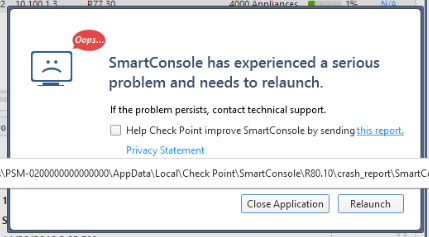
We have automated the checkpoint R80.10 smart console with Cyberark PAS solution .Somehow we manage to automate the login with support of autoIT tool . But as soon as it logged in following error pop-out .
Hope you were also having trouble with onboarding Checkpoint smart console R80.10 and succeed adding it . Could you kindly support us on this ?

Leaderboard
Epsum factorial non deposit quid pro quo hic escorol.
| User | Count |
|---|---|
| 69 | |
| 23 | |
| 7 | |
| 6 | |
| 4 | |
| 4 | |
| 4 | |
| 3 | |
| 3 | |
| 3 |
Thu 09 Jul 2026 @ 10:00 AM (CEST)
Schutz souveräner Workloads: Check Point & die AWS European Sovereign CloudThu 09 Jul 2026 @ 11:00 AM (CEST)
The Cloud Architects Series: Check Point Edge Protection SD-WAN & SASEThu 09 Jul 2026 @ 11:00 AM (EDT)
Tips and Tricks 2026 #9 - What's New with Check Point Email SecurityFri 10 Jul 2026 @ 11:00 AM (IDT)
CheckMates Live Netherlands - Sessie 48: Nieuwe Check Point Workspace SecurityTue 14 Jul 2026 @ 10:00 AM (PDT)
AI Security Masters E11: READY OR NOT: Securing the AI Enterprise 3/5 - AI Workforce SecurityThu 09 Jul 2026 @ 11:00 AM (EDT)
Tips and Tricks 2026 #9 - What's New with Check Point Email SecurityFri 10 Jul 2026 @ 11:00 AM (IDT)
CheckMates Live Netherlands - Sessie 48: Nieuwe Check Point Workspace SecurityTue 14 Jul 2026 @ 10:00 AM (PDT)
AI Security Masters E11: READY OR NOT: Securing the AI Enterprise 3/5 - AI Workforce SecurityThu 30 Jul 2026 @ 10:00 AM (PDT)
AI Security Masters E12: READY OR NOT: Securing the AI Enterprise 4/5 - AI GatewayThu 20 Aug 2026 @ 10:00 AM (PDT)
AI Security Masters E13: READY OR NOT: Securing the AI Ent 5/5 - AI Research & Threat LandscapeAbout CheckMates

Learn Check Point
Advanced Learning
YOU DESERVE THE BEST SECURITY