- Products
- Learn
- Local User Groups
- Partners
- More

AI Security Masters
E1: How AI is Reshaping Our World
MVP 2026: Submissions
Are Now Open!
What's New in R82.10?
Watch NowOverlap in Security Validation
Help us to understand your needs better
CheckMates Go:
Maestro Madness
hello everyone.
First time poster here..
still learning all this.
I am trying to Remotely manage a 3600 Appliance which sits on a DHCP provided address, i have both a dynamic and a DHCP "static" address available..
so for testing i need to have both scenarios working, so i know how to counter multiple issue in the future if they were to arrive.
right now i am stuck with the fact that in the Gaia first time setup i was only able to choose STATIC or dynamic adress on the External interface.. since the ip right now is DHCP supplied as a DHCP reservation from the ISP, it trigs in the gaia and the smart console as a DAIP interface. which it both isnt and somehow is.. its dynamically assigned but it will never change.
so i've read that the solution would be to remove a "flag" from the registry here:
Solution:
Disable the Dynamic Address Gateway (DAG) flag in the registry.
On Gaia / SecurePlatform / Linux Security Gateways:
Edit the $CPDIR/registry/HKLM_registry.data file:
[Expert@HostName:0]# cp -v $CPDIR/registry/HKLM_registry.data $CPDIR/registry/HKLM_registry.data_ORIGINAL
[Expert@HostName:0]# vi $CPDIR/registry/HKLM_registry.data
Search for "DAG".
Change the value of this attribute from 1 to 0::DAG ("[4]1")to
:DAG ("[4]0")
I have been searching all over to find some guides on how to achieve this but i havent come to a solution yet.
can anybody in here shed some light on how i can actually change the mentioned registry file on the 3600 Appliance?
When you perform the steps above and do cprestart, what precisely happens?
Note you should never choose dynamic as the option unless the IP can actually change.
If the IP is always retrieved via DHCP and it will be the same, choose static in the First Time Wizard.
You can configure the external IP using DHCP later on.
When you perform the steps above and do cprestart, what precisely happens?
Note you should never choose dynamic as the option unless the IP can actually change.
If the IP is always retrieved via DHCP and it will be the same, choose static in the First Time Wizard.
You can configure the external IP using DHCP later on.
Hi Phoneboy.
since im new in this Checkpoint world. Would you say its easier for me to just "start over" on the 3000 appliance?
The steps above is actually my first challenge. im dont know how to edit it through ssh.
i tried use winscp to locate the file, but the checkpoint wont accept connection attemps from that one 🙂
and since the "solution" doesnt provide an actual guide but only the answer im somewhat stuck as to fixing the issue.
i can start over, but id love to actually SOLVE the problem instead 🙂
is there anywhere in the support section where i can actually read up on, or find guides on how to manage DAIP gateway and remote gateway.
like "how to's" and stuff like that.
from what i have found so far, it seems like most of the info is for Advanced users only.. not newcomers to the Checkpoint world.
EDIT: I managed to call a friend who helped me change the value from 1 to 0 and did a CPrestart. but that didnt change anything.
i still got an issue when trying to push policy's..
I've attached a Photo of the issue when trying to push a policy
winscp won't work unless you use a user that has bash as the shell instead of clish (which is the default).
You can edit the file on the appliance with "vi", which is a standard Linux/Unix utility.
As I implied in my last message, your situation really isn't "dynamic IP" since your IP will never change.
Also, DAIP gateways have significant limitations (see https://supportcenter.checkpoint.com/supportcenter/portal?eventSubmit_doGoviewsolutiondetails=&solut...), so you shouldn't choose that option unless your IP is truly dynamic (versus just being obtained via DHCP).
These limitations don't apply to our SMB appliances, which run different code more suited for DAIP environments.
To make sure Gaia is configured to use DHCP for the relevant interface, see: https://supportcenter.checkpoint.com/supportcenter/portal?eventSubmit_doGoviewsolutiondetails=&solut...
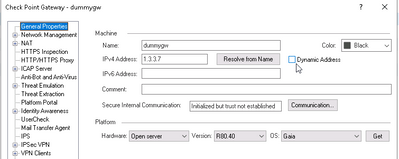
To solve the problem that you currently have, I suspect you'll need to uncheck the Dynamic Address box in your gateway object.
As for "getting started" as a new Check Point customer, you can start with our Check Point for Beginners section on CheckMates (in the Learn menu) which has several "step by step" labs.
There are also links to other free training resources there as well.
While waiting for your response, i Decided to Reset the device and go with the "static" option and say "off" to the upcoming question regarding my interfaces and dealt with them manually after the quick start.
That made it work 🙂
Thank you for the hint though from the beginning, it actually made the difference.
Would you by any chance have another guess at why the "remote gateway" doesnt show log in the management?
the management server is behind nat. and ive done the nat rules for the management server so logs should be able to enter..
i cant even see "hits" on the nat rule
You should configure the NAT in the management object, as described here versus manual NAT rules: https://supportcenter.checkpoint.com/supportcenter/portal?eventSubmit_doGoviewsolutiondetails=&solut...
Leaderboard
Epsum factorial non deposit quid pro quo hic escorol.
Tue 16 Dec 2025 @ 05:00 PM (CET)
Under the Hood: CloudGuard Network Security for Oracle Cloud - Config and Autoscaling!Thu 18 Dec 2025 @ 10:00 AM (CET)
Cloud Architect Series - Building a Hybrid Mesh Security Strategy across cloudsTue 16 Dec 2025 @ 05:00 PM (CET)
Under the Hood: CloudGuard Network Security for Oracle Cloud - Config and Autoscaling!Thu 18 Dec 2025 @ 10:00 AM (CET)
Cloud Architect Series - Building a Hybrid Mesh Security Strategy across cloudsThu 08 Jan 2026 @ 05:00 PM (CET)
AI Security Masters Session 1: How AI is Reshaping Our WorldAbout CheckMates
Learn Check Point
Advanced Learning
YOU DESERVE THE BEST SECURITY