- Products
- Learn
- Local User Groups
- Partners
- More

MVP 2026: Submissions
Are Now Open!
What's New in R82.10?
10 December @ 5pm CET / 11am ET
Announcing Quantum R82.10!
Learn MoreOverlap in Security Validation
Help us to understand your needs better
CheckMates Go:
Maestro Madness
Let's say we have to publish multile access rules to the Checkpoint that have the same source AND destination, but different ports. Is there a REST API that we could use to send a 'group' publish to the Checkpoint? So essentially, today with multiple individual publishes, we would see multiple individual rules published/installed on the Checkpoint, each with a single port number. If the group publish/install feature is avaiable, we should only see one rule, that is for all requested different ports. Same source and destination, but for multiple ports, that is.
Thanks.
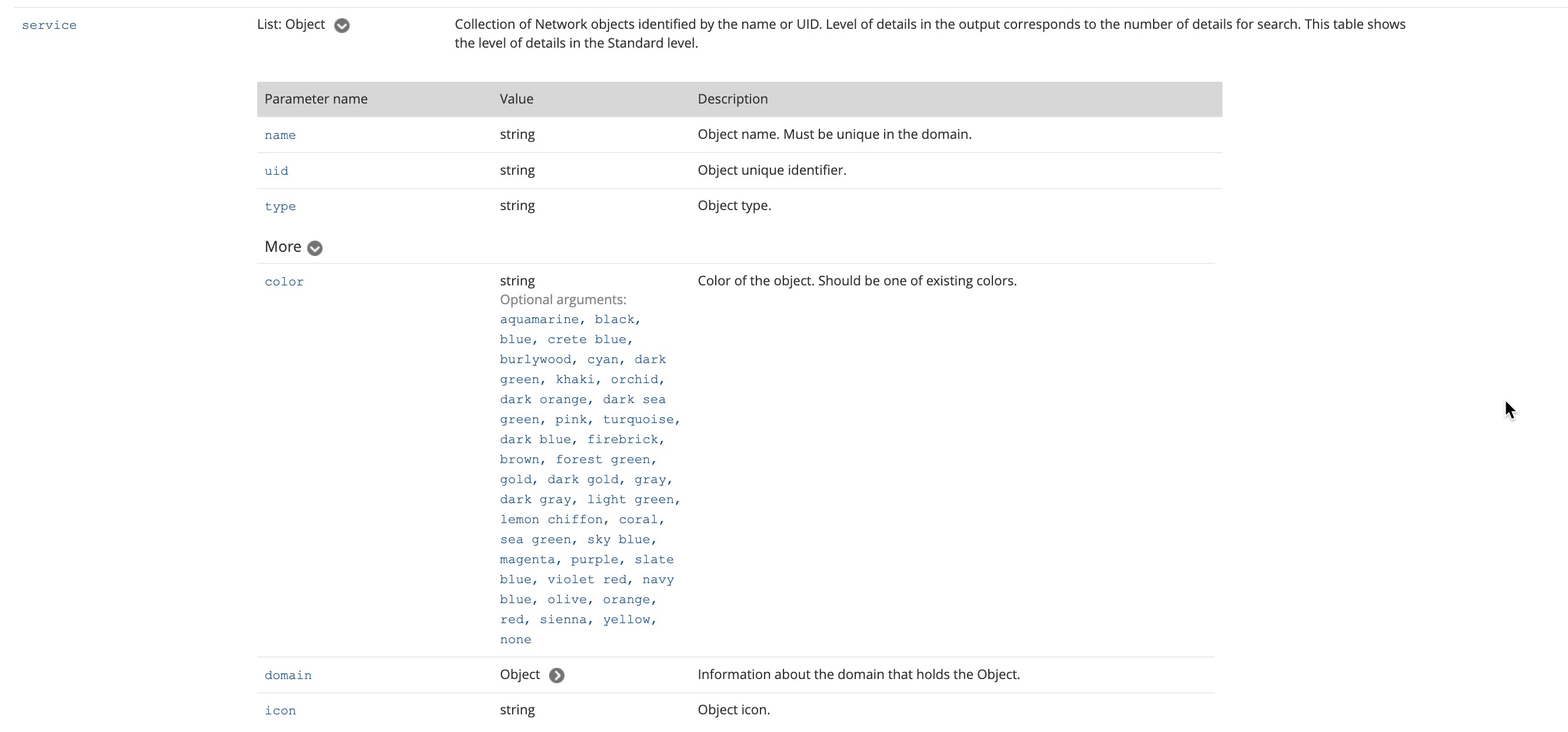
That's also in the return section. Go to the top of the page, and collapse the sections as you go down. An expanded section has a white V in a gray circle, and a collapsed section has a white > in a gray circle. Click on the gray circle to toggle. Once you have everything collapsed, expand the Arguments section. The "service" key accepts string or List: string. Both forms want the string to be either a name or a UUID of an appropriate object.
'service-ranges' isn't used for any configuration. It's only present in returned objects if you include "show-as-ranges":true in your call's body. I just confirmed /add-access-rule doesn't actually accept the show-as-ranges key in the body, so the service-ranges key in the documentation for the return is a documentation bug.
To be sure I understand, it sounds like you're saying you add one rule per service, then publish, and you want the publish to look like it's a single rule instead of two or more. Publishing shows the changes made accurately. If you add multiple rules, it will always show multiple rules added.
Why not just add a single rule with multiple services? Via HTTP, you simply stick an array of service object names or UUIDs into the "service" key. Via mgmt_cli, you have to deal with how mgmt_cli represents arrays and do "service.1 <name or UUID> service.2 <name or UUID> service.3 <name or UUID> ...".
That's also in the return section. Go to the top of the page, and collapse the sections as you go down. An expanded section has a white V in a gray circle, and a collapsed section has a white > in a gray circle. Click on the gray circle to toggle. Once you have everything collapsed, expand the Arguments section. The "service" key accepts string or List: string. Both forms want the string to be either a name or a UUID of an appropriate object.
OK, thanks.
Leaderboard
Epsum factorial non deposit quid pro quo hic escorol.
| User | Count |
|---|---|
| 4 | |
| 2 | |
| 1 | |
| 1 | |
| 1 | |
| 1 | |
| 1 | |
| 1 | |
| 1 | |
| 1 |
Fri 12 Dec 2025 @ 10:00 AM (CET)
Check Mates Live Netherlands: #41 AI & Multi Context ProtocolTue 16 Dec 2025 @ 05:00 PM (CET)
Under the Hood: CloudGuard Network Security for Oracle Cloud - Config and Autoscaling!Fri 12 Dec 2025 @ 10:00 AM (CET)
Check Mates Live Netherlands: #41 AI & Multi Context ProtocolTue 16 Dec 2025 @ 05:00 PM (CET)
Under the Hood: CloudGuard Network Security for Oracle Cloud - Config and Autoscaling!Thu 18 Dec 2025 @ 10:00 AM (CET)
Cloud Architect Series - Building a Hybrid Mesh Security Strategy across cloudsAbout CheckMates
Learn Check Point
Advanced Learning
YOU DESERVE THE BEST SECURITY