- Products
- Learn
- Local User Groups
- Partners
- More

MVP 2026: Submissions
Are Now Open!
What's New in R82.10?
Watch NowOverlap in Security Validation
Help us to understand your needs better
CheckMates Go:
Maestro Madness
Hi, I'm not sure I'm 100% understanding what I actually want, But I used to work with Fortigate all the time and I'm missing that feature in Checkpoint or I just don't understand how to accomplish that.
In fortigate, I can configure the Incoming interface and Outgoing interface for a specific policy.
So when ever I configure a new interface, I have to add a specific policy for it to have network between other interfaces.
Now, on my checkpoint firewall ( x2 5100 ClusterXL ) I have 5 interfaces:
1. Mgmt - Management Interface - 192.168.1.0/24
2. eth1 - External Interface
3. eth2 - DMZ Interface - 192.168.2.0/24
4. eth3 - LAN Interface - 192.168.3.0/24
5. eth5 - Sync Interface - 192.168.4.0/24
For example, Let's take DMZ Interface:
I would like to allow all outbound traffic from DMZ to WAN but if I configure:
Source: DMZ ( network address pool )
Destination: All_Internet
Action: Accept
It will work but he will also have network to the other interfaces.
When I check the logs, I can see it's communicating the other interfaces through the "All_Internet" policy even though I want it to allow only WAN traffic..
Sorry for the lack of knowledge.
First of all there is only one access policy that applies to all interfaces.
You just have to make your policy more specific.
If you look at the All_Internet object you will notice it is a range object that says 0.0.0.0-255.255.255.255.
Which means it will allow access to any IP regardless of interface.
What you want to use instead is the object Internet (I believe) which corresponds to the Zone assigned to your external interface.
You can confirm this by looking at the interface definitions on the gateway object and see what Zone that is assigned to your external interface.
In any case, you can assign arbitrary Zones to each interface and use that in your Access Policy.
You will not be able to use them in your NAT policy, however, which is planned for R81.
First of all there is only one access policy that applies to all interfaces.
You just have to make your policy more specific.
If you look at the All_Internet object you will notice it is a range object that says 0.0.0.0-255.255.255.255.
Which means it will allow access to any IP regardless of interface.
What you want to use instead is the object Internet (I believe) which corresponds to the Zone assigned to your external interface.
You can confirm this by looking at the interface definitions on the gateway object and see what Zone that is assigned to your external interface.
In any case, you can assign arbitrary Zones to each interface and use that in your Access Policy.
You will not be able to use them in your NAT policy, however, which is planned for R81.
I can understand that.
Thank you!
Hi, Can you please tell me where in my policy I need to put the "Zone" object?
These are the columns I have:
So lets say I have a network object for my DMZ vLAN:
192.168.2.0 - 255.255.255.0
and I want to allow some traffic to another interface ( Zone ), Do I put the zone object & vLAN object in "Source" column?
Thanks
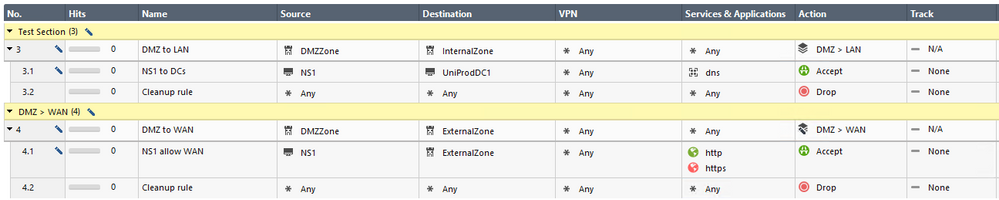
Can you please tell me if that example is good?
What I'm trying to accomplish is:
Allow traffic from NS1 ( in DMZ interface ) to UniProdDC1 ( in LAN interface ) with DNS protocol only.
Allow traffic from NS1 ( in DMZ interface ) to WAN interface with http/https ( to allow internet ).
Leaderboard
Epsum factorial non deposit quid pro quo hic escorol.
| User | Count |
|---|---|
| 19 | |
| 16 | |
| 7 | |
| 5 | |
| 5 | |
| 4 | |
| 4 | |
| 4 | |
| 4 | |
| 4 |
Fri 12 Dec 2025 @ 10:00 AM (CET)
Check Mates Live Netherlands: #41 AI & Multi Context ProtocolTue 16 Dec 2025 @ 05:00 PM (CET)
Under the Hood: CloudGuard Network Security for Oracle Cloud - Config and Autoscaling!Fri 12 Dec 2025 @ 10:00 AM (CET)
Check Mates Live Netherlands: #41 AI & Multi Context ProtocolTue 16 Dec 2025 @ 05:00 PM (CET)
Under the Hood: CloudGuard Network Security for Oracle Cloud - Config and Autoscaling!Thu 18 Dec 2025 @ 10:00 AM (CET)
Cloud Architect Series - Building a Hybrid Mesh Security Strategy across cloudsAbout CheckMates
Learn Check Point
Advanced Learning
YOU DESERVE THE BEST SECURITY