- Products
- Learn
- Local User Groups
- Partners
- More

MVP 2026: Submissions
Are Now Open!
What's New in R82.10?
Watch NowOverlap in Security Validation
Help us to understand your needs better
CheckMates Go:
Maestro Madness
We are moving some of our resources to AWS cloud space. We've setup rules to allow traffic to/from and from/to internal resources/external resources. The issue we are now seeing is that in the cloud space, their source IP addresses constantly change. We have to go in, look at the logs, see what IPs have changed and update the rules. How are folks setting up rules for cloud sources so that they aren't constantly going in and updating their rule set.
Thanks,
Sean
It really depends on how detailed your rules have to be. One option is to just use small subnets vor every usecase and build the rules based on that. Another option would be to use the AWS Datacenter Object so you could easily use tags etc. on the machines.
We use both options currently (but GCP and not AWS) and for basic internet access we use the zone Objects so we don't even have to add new subnets to the rulebase.
I'm newer to this. Our rule base has a source IP address and a desination IP address/DNS Name. We aren't given any groups of subnets really to use to create a AWS DC object. Don't recognize what GCP is referencing. Is that global Checkpoint Policy?
Sorry, still tryin to pick this up.
I was talking about the CloudGuard Controller: Supported Data Centers (checkpoint.com)
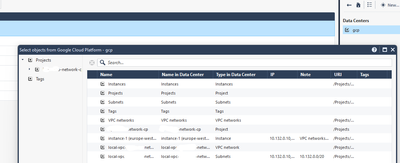
You can add your AWS credentials (permissions needed are in this document) to a Data Center Object and import resources based on vpc, subnets, tags etc. It looks like this for GCP (Google Cloud Platform):
You create this Data Center Objects and afterwards you can right-click on it and select "import". Select the resources you want. They are updated automatically.
This is what Cloud Management Extension (formerly CloudGuard Controller) is designed to solve.
See: https://supportcenter.checkpoint.com/supportcenter/portal?eventSubmit_doGoviewsolutiondetails=&solut...
You can create objects based on their definition in AWS.
Your gateways (on premise and/or in the cloud) will be continually up-to-date with the relevant IP addresses.
Was the CME also a part of CloudGuard Controller naming before? Because that is a different feature: Introduction to CloudGuard Controller (checkpoint.com)
CME is for managing the Gateways etc. itself (from what I understand) and CloudGuard Controller is for using actual resources from the Cloud in the rulebase.
I believe at one point they were the same, but you're right, they're different.
CloudGuard Controller is definitely what I was thinking of.
Leaderboard
Epsum factorial non deposit quid pro quo hic escorol.
| User | Count |
|---|---|
| 12 | |
| 10 | |
| 9 | |
| 8 | |
| 6 | |
| 3 | |
| 2 | |
| 2 | |
| 2 | |
| 1 |
Tue 16 Dec 2025 @ 05:00 PM (CET)
Under the Hood: CloudGuard Network Security for Oracle Cloud - Config and Autoscaling!Thu 18 Dec 2025 @ 10:00 AM (CET)
Cloud Architect Series - Building a Hybrid Mesh Security Strategy across cloudsTue 16 Dec 2025 @ 05:00 PM (CET)
Under the Hood: CloudGuard Network Security for Oracle Cloud - Config and Autoscaling!Thu 18 Dec 2025 @ 10:00 AM (CET)
Cloud Architect Series - Building a Hybrid Mesh Security Strategy across cloudsAbout CheckMates
Learn Check Point
Advanced Learning
YOU DESERVE THE BEST SECURITY